Personal Finance Calculator Suite: Your Complete Money Management Toolkit
Stop guessing with your finances. Get instant clarity on your budget, debt payoff timeline, retirement savings, and emergency fund—all in one place.
Finally, A Financial Calculator That Actually Makes Sense
Let's be honest—managing money feels overwhelming. You've got bills piling up, retirement seems like a distant dream, and that credit card balance just won't budge no matter how much you pay. Sound familiar?
Here's the thing: you don't need another complicated spreadsheet or expensive financial advisor. What you need is clarity. That's exactly what our Personal Finance Calculator Suite delivers—in plain English, with real numbers, in under 5 minutes.
Whether you're a recent college grad drowning in student loans, a young professional trying to maximize your 401(k), or a parent planning for your family's future, these tools meet you where you are. No jargon. No judgment. Just straightforward calculations that show you exactly where your money's going and where it could be going.
Why Smart Americans Are Ditching Guesswork for Calculators
Remember that time you thought you were "pretty good" with money, then checked your bank account and wondered where it all went? Yeah, we've all been there.
The Problem With "Eyeballing" Your Finances
Most of us manage money like we're cooking without a recipe—we throw in a little savings here, pay some bills there, and hope it all works out. But here's what happens when you fly blind:
- You overpay on interest: Without seeing the real cost of minimum payments, that $5,000 credit card balance could cost you $12,000+ over time
- You miss retirement deadlines: Waiting just 5 years to start investing could cost you $200,000+ by retirement
- Your emergency fund falls short: The average American thinks they need $10,000 saved—but actual 3-month expenses run closer to $15,000-$20,000
- You leave free money on the table: Not maximizing your 401(k) match? That's like turning down a 50% raise
What Changes When You Use Real Data
Our Personal Finance Calculator Suite doesn't just crunch numbers—it reveals opportunities. Suddenly, you can see:
🎯 Exact Payoff Dates
Know the exact month you'll be debt-free, not "someday"
💰 Hidden Savings
Find an extra $200-$500/month without changing your lifestyle
📈 Retirement Reality
See if you're on track—or how to catch up fast
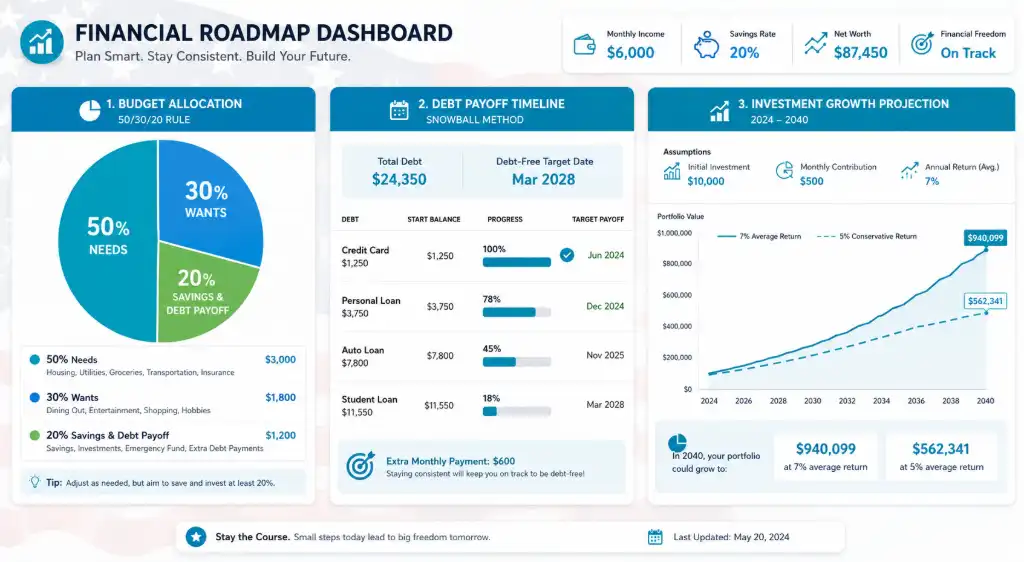
US Household Budget Allocation Calculator: Master the 50/30/20 Rule
What Is the 50/30/20 Budget Rule (And Does It Actually Work)?
You've probably heard of the 50/30/20 rule. Maybe you even tried it once, gave up after two weeks, and went back to wondering why your paycheck disappears by the 15th.
Here's what most budget articles won't tell you: the 50/30/20 rule isn't one-size-fits-all. A single person in rural Kansas has very different expenses than a family of four in San Francisco. That's why our US household budget allocation calculator with 50/30/20 rule breakdown adjusts for your reality.
How the Calculator Works (In Plain English)
Think of this as your financial GPS. You tell it:
- Your monthly take-home pay (after taxes, 401k, health insurance—whatever actually hits your bank account)
- Your fixed expenses (rent/mortgage, car payment, insurance, minimum debt payments)
- Your variable spending (groceries, gas, dining out, Netflix, that Target run you didn't plan)
The calculator then shows you exactly where you stand compared to the 50/30/20 framework:
The Breakdown:
- 50% Needs: Housing, utilities, groceries, transportation, insurance, minimum debt payments
- 30% Wants: Dining out, entertainment, hobbies, subscriptions, vacations
- 20% Savings & Debt: Emergency fund, retirement, extra debt payments, investments
Real-Life Example: Sarah's Budget Wake-Up Call
Sarah, a 28-year-old nurse in Ohio, makes $4,200/month after taxes. She thought she was "doing okay" until she plugged her numbers into our calculator:
• Needs: 68% (way over the 50% target—her car payment and student loans were killing her)
• Wants: 22% (actually under control!)
• Savings: 10% (half of where she should be)
The Fix: By refinancing her student loans and selling her expensive car for a reliable used model, she dropped Needs to 52% and doubled her savings rate in 6 months.
State-by-State Adjustments That Matter
Living in Texas? No state income tax means more take-home pay. In California? That 9.3% state tax on middle incomes changes everything. Our calculator factors in:
- State and local tax rates
- Regional cost-of-living differences (housing in NYC vs. Nashville)
- State-specific retirement contribution limits
- Local utility averages
Try our Advanced Federal and State Tax Calculator and see your personalized breakdown in seconds.
401k vs Roth IRA Contribution Optimizer: Stop Leaving Free Money Behind
The Retirement Decision That Could Cost (Or Make) You $100,000+
Here's a question that keeps a lot of people up at night: Should I contribute to my traditional 401(k), Roth IRA, or both? And more importantly—how much?
Get this wrong, and you could pay tens of thousands in unnecessary taxes. Get it right, and you're basically giving yourself a raise.
Why This Calculator Is Different
Most retirement calculators ask three questions and tell you you're "on track" or "behind." Ours digs deeper. Our 401k vs Roth IRA contribution optimizer calculator for US tax brackets considers:
📊 Your Current Tax Bracket
Are you in the 12%, 22%, or 32% federal bracket? This changes everything.
🏢 Employer Match Details
Free money from your job? We calculate the exact ROI.
🎯 Future Tax Projections
Will you be in a higher or lower bracket in retirement?
The 2026 Contribution Limits (Don't Miss These)
The IRS just announced new limits, and they're pretty generous:
- 401(k), 403(b), most 457 plans: $23,500 (or $31,000 if you're 50+)
- Traditional & Roth IRA: $7,000 (or $8,000 if you're 50+)
- Combined total: You can max BOTH if you have the income
Case Study: The $87,000 Mistake
Marcus, 35, makes $85,000/year. His employer offers a 4% match. He was contributing 4% to get the full match—smart. But he was doing it all traditional 401(k), missing out on Roth benefits.
Our calculator showed him that by splitting his contributions (4% traditional for the match + $500/month Roth IRA), he'd save $87,000 in taxes over 30 years. That's not a typo.
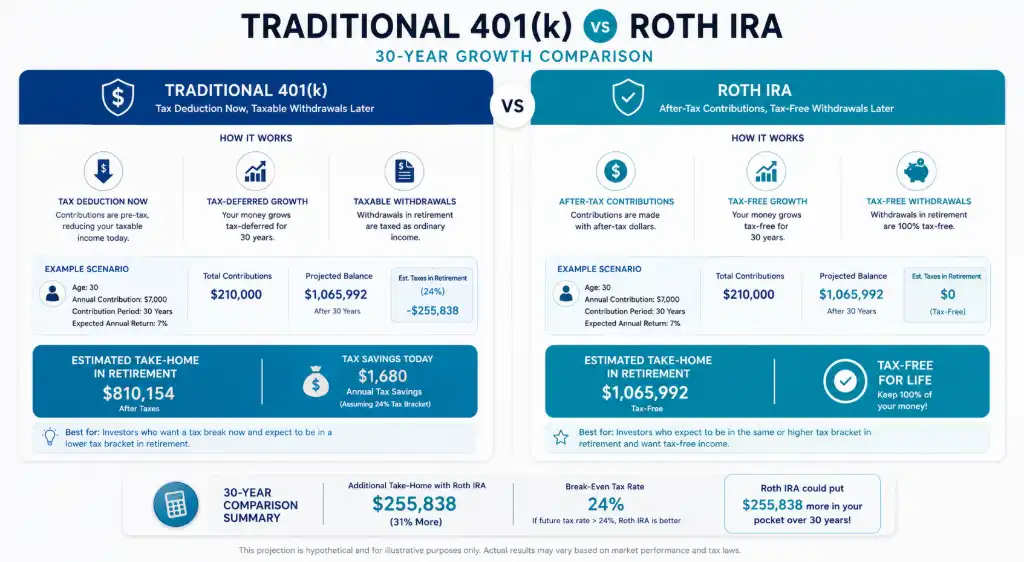
When to Choose Traditional 401(k):
- You're in a high tax bracket now (24%+)
- You expect lower income in retirement
- Your employer match is generous
- You need the immediate tax deduction
When Roth IRA Makes More Sense:
- You're early career (20s-30s) in a lower bracket
- You expect higher income later
- You want tax-free withdrawals in retirement
- You value flexibility (Roth contributions can be withdrawn penalty-free)
Use our retirement optimizer to find your perfect split.
Calculate Credit Card Debt Payoff Timeline: The Avalanche Method That Actually Works
Why Minimum Payments Are Keeping You Broke
Let's talk about something uncomfortable: your credit card debt. If you're making minimum payments, here's the harsh truth—you might never pay it off. Or worse, you'll spend 15-20 years paying 2-3x the original amount in interest alone.
But there's hope. And math on your side.
The Avalanche Method vs. The Snowball Method
You've probably heard of both strategies. Here's the real difference:
Avalanche Method (Mathematically Superior)
- How it works: Pay minimums on everything, throw extra money at the HIGHEST interest rate debt first
- Best for: Saving the most money on interest
- Example: Credit card at 24.99% APR gets attacked before your 6.5% student loan
- Psychological challenge: You might not see quick wins if your highest-rate debt is large
Snowball Method (Psychologically Easier)
- How it works: Pay minimums on everything, eliminate the SMALLEST balance first
- Best for: Quick wins that keep you motivated
- Example: That $800 medical bill gets paid off before the $8,000 credit card
- Financial cost: You'll pay more in interest overall
Real Numbers: What the Avalanche Method Saves You
Let's say you have:
- Credit Card A: $8,000 at 24.99% APR, $200 minimum
- Credit Card B: $3,500 at 19.99% APR, $100 minimum
- Student Loan: $15,000 at 5.5% APR, $150 minimum
- Extra payment available: $300/month
• Pay off Credit Card A first (highest rate)
• Total interest paid: $6,847
• Debt-free date: 38 months
Snowball Method Results:
• Pay off Credit Card B first (smallest balance)
• Total interest paid: $7,923
• Debt-free date: 41 months
Savings with Avalanche: $1,076 and 3 months faster!
Current US APR Rates (2026)
Knowing average rates helps you see if you're getting ripped off:
- Average credit card APR: 21.5% (but rewards cards average 24-26%)
- Store credit cards: 28-30% (avoid these like the plague)
- Personal loans: 11-18% (better option for consolidation)
- Balance transfer cards: 0% intro for 15-21 months (then 18-25%)
Our calculate credit card debt payoff timeline with avalanche method US APR rates tool shows you the exact month you'll be debt-free based on your actual balances and interest rates.
Pro Tip: The Balance Transfer Hack
If you have good credit (670+), consider a 0% balance transfer card. Transfer your highest-interest debt, pay it off during the intro period, and save thousands. Just don't rack up new debt on the old cards!
Emergency Fund Calculator: How Much Do You REALLY Need?
Why "3-6 Months of Expenses" Is Terrible Advice
Every financial guru says to save 3-6 months of expenses. But here's what they don't tell you: a single parent in Mississippi needs a very different emergency fund than a dual-income couple in Seattle.
Our emergency fund calculator based on US median monthly expenses by state and household size gets specific—because your emergency fund should match your life.
The Factors That Actually Matter
1. Your Job Stability
- Government/tenured: 3 months might be enough
- Corporate/tech: 4-6 months (layoffs happen fast)
- Gig economy/commission: 6-9 months (income varies)
- Small business owner: 9-12 months (feast or famine)
2. Household Size & Dependents
According to 2026 Bureau of Labor Statistics data:
- Single person: Median monthly expenses $3,200
- Two-person household: Median $5,100
- Family of four: Median $7,800
- Add $800-1,200 per additional child
3. Your State's Cost of Living
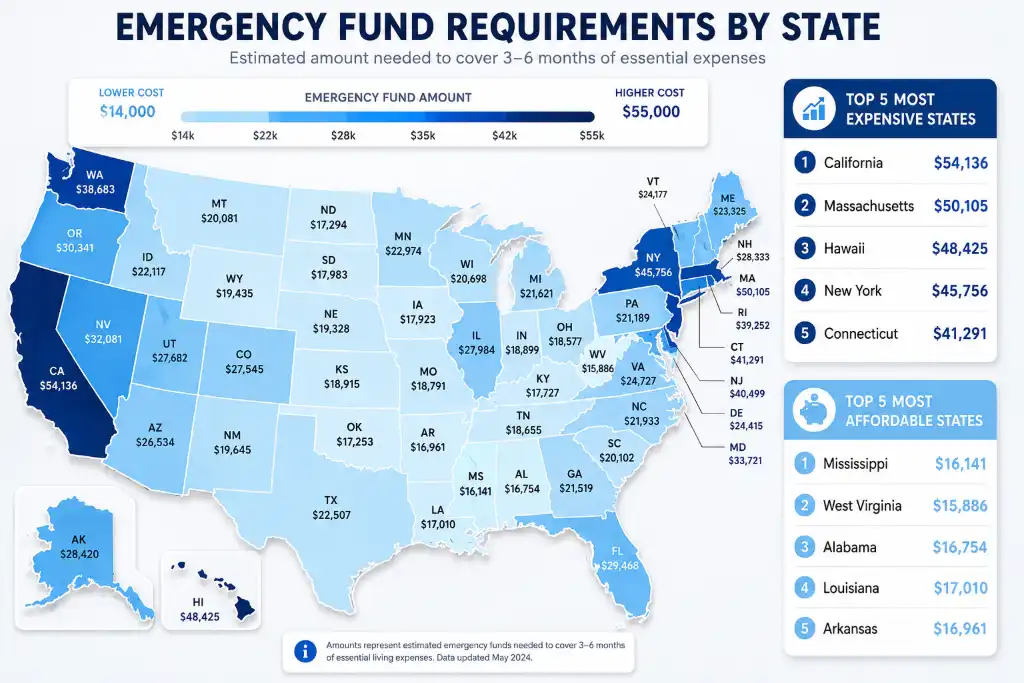
Emergency fund needs vary wildly by location:
🏙️ High Cost States
California, New York, Massachusetts:
6-month fund: $35,000-$55,000
Housing eats 40-50% of income
🌾 Medium Cost States
Texas, Florida, Ohio:
6-month fund: $20,000-$32,000
No state income tax helps
🏔️ Low Cost States
Mississippi, Arkansas, West Virginia:
6-month fund: $14,000-$22,000
Stretch your dollars further
Where to Keep Your Emergency Fund (2026 Best Options)
Your emergency fund needs to be:
- Safe: FDIC-insured (up to $250,000)
- Liquid: Accessible within 1-2 business days
- Earning interest: Why let inflation eat it?
Best Options Right Now:
- High-yield savings accounts: 4.5-5.2% APY (Ally, Marcus, Discover)
- Money market accounts: 4.8-5.5% APY with check-writing
- Treasury bills: 5.0-5.3% (state tax-free, but less liquid)
- NO: Regular savings accounts (0.01% APY = losing money)
Emergency Fund Calculator Example
The Johnson family in Denver:
- Two incomes, one child
- Monthly expenses: $6,200
- Both have stable jobs (5+ years)
- Recommended fund: 4 months = $24,800
- Current savings: $8,500
- Gap: $16,300
- Time to goal: 18 months saving $900/month
How Our Personal Finance Calculator Suite Works (In 3 Simple Steps)
No Finance Degree Required
We built this tool for real people—not Wall Street analysts. Here's how it works:
Step 1: Enter Your Numbers
Tell us about your income, expenses, debts, and goals. Takes 3-5 minutes. We don't ask for your name, email, or Social Security number—privacy first.
Step 2: See Your Financial Picture
Instantly visualize your budget allocation, debt payoff timeline, retirement projection, and emergency fund status. Charts update in real-time as you adjust numbers.
Step 3: Take Action
Download your personalized plan as a PDF, save it to your browser, or load it later. Share it with your spouse or financial advisor. Make informed decisions.
What Makes This Different From Other Calculators?
- ✅ No signup required: Use it immediately, no email needed
- ✅ USA-specific: Accounts for US tax brackets, 401(k) limits, and state variations
- ✅ Real-time updates: Change one number, see everything adjust instantly
- ✅ Mobile-friendly: Works perfectly on your phone or tablet
- ✅ Export options: Save as PDF, print, or email to yourself
- ✅ 100% free: No hidden fees, no premium upgrades
Ready to Take Control of Your Money?
Join thousands of Americans who've already used our calculators to pay off debt, boost savings, and plan for retirement.
Try It Free Now →Frequently Asked Questions
Yes, 100% free. No credit card required, no premium tiers, no hidden fees. We believe everyone deserves access to quality financial tools regardless of their budget. We monetize through optional affiliate links to financial products we genuinely recommend (like high-yield savings accounts), but the calculators themselves are completely free to use.
Nope! We don't require an email, name, or any personally identifiable information. Your data stays on your device. If you want to save your calculations, you can use the "Save Data" button which stores information in your browser's local storage (not on our servers). You can also export to PDF or print your results.
Our calculators use industry-standard formulas and current 2026 IRS guidelines for retirement contributions and tax brackets. However, they provide estimates, not guarantees. Actual results may vary based on market performance, tax law changes, and individual circumstances. We recommend consulting a certified financial planner or tax professional for personalized advice, especially for complex situations like business ownership or estate planning.
While the calculators will technically work, they're specifically designed for US financial systems—US tax brackets, 401(k)/IRA retirement accounts, US average APR rates, and state-specific cost of living data. If you're in Canada, the UK, Australia, or elsewhere, the numbers won't reflect your local tax laws, contribution limits, or typical expenses. We're planning international versions in the future!
The 50/30/20 rule suggests spending 50% of after-tax income on needs (housing, food, utilities), 30% on wants (entertainment, dining out, hobbies), and 20% on savings and debt repayment. It's a solid starting point, but not rigid. High-cost areas might need 60% for needs. Aggressive savers might do 50/20/30. Use it as a framework, not a straitjacket. Our calculator shows your actual percentages so you can adjust based on your reality.
Great question! The answer: both, strategically. Here's the priority order:
1. Get a $1,000 starter emergency fund
2. Contribute enough to get your full 401(k) employer match (it's free money—typically 100% ROI)
3. Pay off high-interest debt (anything above 7-8% APR, especially credit cards)
4. Build your full emergency fund (3-6 months)
5. Max out Roth IRA ($7,000 in 2026)
6. Return to maxing 401(k)
Our calculator helps you visualize different scenarios.
Mathematically, the avalanche method (paying highest interest rate first) saves you more money and gets you debt-free faster. Psychologically, the snowball method (paying smallest balance first) provides quick wins that keep you motivated. Our data shows people using avalanche save an average of $1,200-$2,500 more per $10,000 of debt. However, if you need motivation to stay on track, snowball might be worth the extra cost. Try both methods in our calculator to see the difference for your specific debts.
At minimum, contribute enough to get your full employer match—usually 3-6% of your salary. That's an instant 50-100% return. Ideally, aim for 15% of gross income (including employer match). The 2026 limit is $23,500, or $31,000 if you're 50+. If you can't hit 15% yet, start with 10% and increase 1% every 6 months. Our retirement optimizer shows exactly how different contribution levels affect your retirement date and total savings.
It depends on your current vs. expected future tax bracket. Choose Traditional 401(k) if you're in a high bracket now (24%+) and expect lower income in retirement—you get the tax deduction now. Choose Roth IRA if you're early-career in a lower bracket (12-22%) and expect higher income later—you pay taxes now but withdraw tax-free in retirement. Many people benefit from a mix of both for tax diversification. Our optimizer calculator shows your ideal split based on your specific situation.
Your emergency fund should be in a safe, liquid, FDIC-insured account earning competitive interest. Best options in 2026:
• High-yield savings account (4.5-5.2% APY)
• Money market account (4.8-5.5% APY with check access)
• Treasury bills (5.0-5.3%, state tax-free)
Avoid: Regular savings accounts (0.01% APY), CDs (penalties for early withdrawal), or investing it in stocks (too volatile). You need immediate access without risk of loss.
Track every dollar for 3 months using your bank statements, credit card bills, and receipts. Categorize expenses as:
• Fixed: Rent/mortgage, car payment, insurance, subscriptions
• Variable: Groceries, gas, utilities, dining out
• Irregular: Car maintenance, medical bills, gifts, vacations (divide annual cost by 12)
Add them all up for your true monthly number. Most people underestimate by 15-25%. Our budget calculator helps you categorize and track.
Absolutely—and you should! The key is prioritizing. Always get your 401(k) employer match first (it's free money with 100% instant return). Then split extra funds between high-interest debt payoff and Roth IRA contributions. Example: If you have $1,000/month extra, put $500 toward credit card debt at 22% APR and $500 into Roth IRA. You're getting a guaranteed 22% return on debt payoff plus tax-free growth on retirement savings.
First, don't panic. About 40% of Americans are behind. Here's how to catch up:
• Max out catch-up contributions if 50+ ($31,000 for 401k, $8,000 for IRA)
• Increase contributions 1-2% annually
• Work longer (delaying retirement from 65 to 67 adds ~$100k)
• Reduce expected retirement lifestyle costs
• Consider part-time work in retirement
Our retirement calculator shows different catch-up scenarios so you can choose your path.
It depends on your monthly expenses. $10,000 covers:
• 3 months if you spend $3,333/month
• 4 months if you spend $2,500/month
• 6 months if you spend $1,667/month
The average US household spends $5,100/month, needing $15,300 for 3 months or $30,600 for 6 months. Single people might be fine with $10k. Families typically need $20k-$40k. Use our emergency fund calculator to find your personalized target based on your state, household size, and job stability.
Review and update your financial plan:
• Quarterly: Check budget vs. actual spending
• Annually: Recalculate retirement projections, adjust for raises/inflation
• After major life events: Marriage, divorce, baby, job loss, inheritance, buying a home
• When tax laws change: Major legislation affects retirement and tax strategies
Our calculator saves your data in your browser, so you can easily reload and adjust numbers anytime.
No 401(k)? No problem. Prioritize these options:
1. Open a Roth IRA ($7,000 limit in 2026)
2. If self-employed, open a SEP-IRA or Solo 401(k) (up to $69,000 limit)
3. Invest in a taxable brokerage account after maxing IRA
4. Consider Health Savings Account (HSA) if you have high-deductible insurance—triple tax-advantaged
You can still build serious wealth without an employer plan. Our calculator shows IRA-only scenarios.
Yes! Our Personal Finance Calculator Suite is fully responsive and works perfectly on smartphones, tablets, and desktop computers. The interface automatically adjusts to fit your screen size. You can enter data, view charts, and export PDFs right from your iPhone or Android device. Many users find it convenient to update their numbers monthly using their phone.
By default, your data is stored in your browser's local storage, which persists even after closing the browser—unless you clear your browser data. For permanent storage, use the "Save Data" button to download a JSON file, or "Export PDF" to save a printable version. You can also email results to yourself. We don't store your data on our servers, so it's private but your responsibility to back up.
Stop Wondering, Start Knowing
Your financial future isn't something to guess about. Get clear, actionable insights in the next 5 minutes—free.
Launch Calculator Suite Now →✓ No signup required ✓ 100% free ✓ USA-focused tools