



USA PDF Page Splitter: Split American Documents Easily
PDF Splitter Tool
or drag and drop PDF here
- Split PDF by page ranges (e.g., 1-3, 5, 7-10)
- Extract individual pages as separate files
- Visual page selection with thumbnails
- Custom output file naming
- Preserve original quality
- Fast processing with no file size limits
Select Pages to Extract
Click on thumbnails below or enter page ranges.
Processing your PDF...
Free PDF Splitter Online – Split PDF Pages Instantly
Splitting a PDF file into multiple pages has never been easier. Our free PDF splitter tool allows you to quickly separate pages from any PDF document without installing software.
Whether you want to extract specific pages, split a large document, or organize your files, this online PDF Splitter Tool helps you do it in seconds.
This utility maintains the PDF file’s original quality while operating directly within your browser.
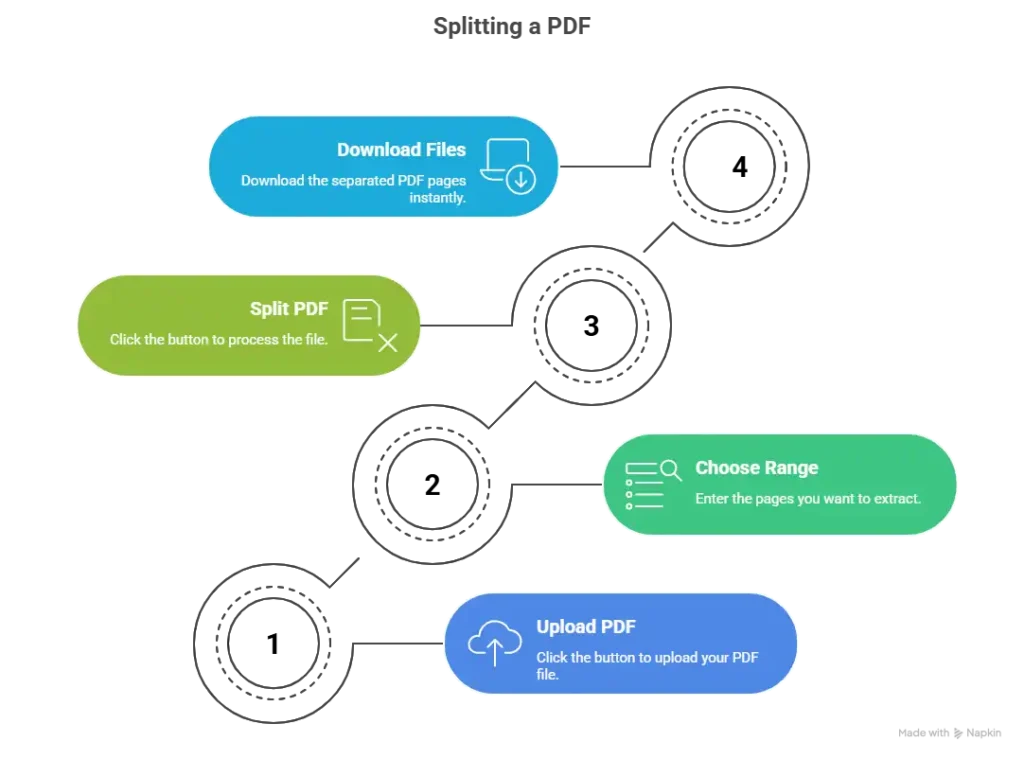
How the PDF Splitter Works (Step-by-Step)
The tool combines PDF loading with instant data visualization. Here’s how to use it:
Load a PDF: Click “CHOOSE FILE” to select any PDF from your device. Then press “LOAD & COUNT” to read the document. The total page count will appear in the blue badge.
Define Splits: In the text field, enter the page ranges you want, separated by commas (e.g.,
1-3,4-6,7-8). The example shows a valid format.Generate Splits: Click the “★ SPLIT PDF ★” button. The tool will validate your ranges against the total page count.
Pro Tips for Better Results
Preview before splitting – Many tools offer page thumbnails to verify selections
Check page numbering – Ensure you’re using the correct page numbers (some documents start numbering from a title page)
Maintain metadata – Some advanced tools let you preserve document properties
Test with a small file first – If you’re new to the tool, try with a short document to understand the workflow
The Ultimate Guide to PDF Page Splitters: Everything You Need to Know in 2026
In today’s digital landscape, PDF documents have become the universal standard for sharing and preserving information. Whether you’re dealing with contracts, academic papers, or business reports, PDFs are everywhere. But what happens when you need only specific pages from a lengthy document? This is where PDF page splitters come to the rescue.
In this comprehensive guide, we’ll explore everything about PDF page splitters – what they are, how to use them, their benefits, who needs them, and why they should be an essential tool in your digital arsenal.
What is a PDF Page Splitter?
A PDF page splitter is a specialized software tool designed to divide a single PDF document into multiple smaller PDF files based on user-defined criteria. Unlike simple PDF editors that only allow basic modifications, a page splitter focuses exclusively on the segmentation of documents.
Benefits of Using a PDF Page Splitter
The advantages of using a dedicated PDF splitter extend far beyond simple document division. Let’s explore the comprehensive benefits:
1. Enhanced Document Management
Organization Efficiency – Large documents become manageable when broken into logical sections. Instead of scrolling through a 200-page manual, you can access individual chapters instantly.
Simplified Archiving – Split documents can be filed more logically in your digital storage system. Tax documents by year, contracts by client, or reports by quarter become easier to locate.
2. Improved Collaboration
Targeted Sharing – Send only relevant sections to team members. No more “please see pages 45-67 of this massive document” emails.
Reduced Bandwidth – Smaller files transfer faster and consume less bandwidth, especially important when working remotely or with limited internet connections.
Version Control – When working on specific sections, having separate files makes it easier to track changes and maintain version history.
3. Data Security and Privacy
Minimal Exposure – When sharing documents, you expose only necessary pages. Confidential information on other pages remains protected.
Compliance Benefits – For regulated industries (healthcare, finance, legal), splitting documents helps maintain compliance by ensuring sensitive data isn’t inadvertently shared.
4. Workflow Optimization
Integration with Other Tools – Split PDFs can feed directly into other workflows: e-signature tools, document management systems, or printing services.
Automation Potential – Many modern splitters offer batch processing and API access for automated document handling.
Time Savings – What might take 15 minutes of manual copy-pasting becomes a 30-second automated process.
5. Cost Efficiency
Reduced Storage Needs – While splitting doesn’t reduce total file size, it eliminates the need to store redundant copies of large documents when only sections are needed.
Printing Savings – When printing only specific sections, you save paper, ink, and time.
6. Professional Presentation
Client-Ready Documents – Present clients with exactly the information they need, without irrelevant pages.
Brand Consistency – Some tools allow you to add headers, footers, or watermarks to split documents, maintaining professional branding.
Who Can Benefit from PDF Page Splitters?
The applications are virtually limitless, but certain professions and scenarios particularly benefit:
Legal Professionals
Lawyers deal with massive case files, contracts, and discovery documents. Splitting allows them to:
Extract specific clauses for review
Share only relevant sections with clients
Organize exhibits for court filings
Maintain attorney-client privilege by sharing minimally
Academic Researchers
Students and academics frequently work with lengthy papers, theses, and research materials:
Extract chapters for literature reviews
Share specific sections with collaborators
Create course packs from multiple sources
Organize research materials by topic
Business Executives
Corporate environments generate endless reports, proposals, and contracts:
Extract executive summaries for quick review
Share financial sections with accounting
Distribute project plans to relevant teams
Create client-specific proposal packages
Healthcare Providers
Medical professionals handle patient records, research papers, and insurance documents:
Share relevant portions of patient records with specialists
Extract billing information for insurance claims
Compile research for treatment protocols
Maintain HIPAA compliance through minimal data sharing
Real Estate Agents
Property transactions involve numerous documents:
Separate purchase agreements from disclosures
Extract property descriptions for marketing
Share inspection reports with potential buyers
Organize closing documents by category
Freelancers and Consultants
Independent professionals manage multiple clients and projects:
Create customized reports for each client
Extract relevant portfolio pieces
Manage contracts and proposals efficiently
Organize project documentation
Government Employees
Public sector workers handle extensive documentation:
Extract public information for FOIA requests
Separate classified from unclassified material
Organize legislative documents
Create public-facing information packets
Students
From high school to graduate studies:
Extract study guides from textbooks
Share notes with study groups
Submit only required portions of assignments
Organize research papers by topic
Why WE Should Use a PDF Page Splitter
Understanding the “why” behind using a PDF splitter helps justify its place in your digital toolkit:
1. Precision and Control
In an age of information overload, the ability to extract exactly what you need is invaluable. PDF splitters put you in control, allowing you to work with documents on your terms rather than being constrained by their original structure.
2. Professional Competence
Using the right tool for the right job demonstrates technical competence. In professional settings, knowing how to efficiently manipulate documents sets you apart and increases your value to employers and clients.
3. Time is Money
Whether you bill by the hour or value your personal time, efficiency matters. PDF splitters reduce document handling time from minutes to seconds, with cumulative savings that add up significantly over time.
4. Environmental Responsibility
By printing only needed pages and reducing digital storage requirements, PDF splitters contribute to environmental sustainability. Every page not printed saves trees, water, and energy.
5. Competitive Advantage
In business, those who work smarter win. PDF splitters enable faster responses, more precise communications, and better-organized information – all competitive advantages in fast-paced environments.
6. Future-Proofing Your Workflow
As documents become more complex and digital transformation accelerates, proficiency with document tools becomes essential. Mastering PDF splitters now prepares you for increasingly digital future workflows.
7. Stress Reduction
Few things are more frustrating than wrestling with unwieldy documents. PDF splitters eliminate this stress, making document management smooth and intuitive.
8. Accessibility Improvement
Breaking large documents into smaller pieces improves accessibility for users with disabilities. Screen readers and assistive technologies often perform better with shorter, focused documents.
Conclusion
PDF page splitters are deceptively simple tools with profound implications for how we work with digital documents. From legal professionals protecting client confidentiality to students organizing research materials, the applications are diverse and valuable.
The best part? Most PDF splitters are accessible – many are free for basic use, with premium features available at reasonable costs. Whether you choose a web-based tool for occasional use or desktop software for heavy lifting, incorporating a PDF splitter into your workflow will pay dividends in efficiency, organization, and peace of mind.
In a world where information continues to grow exponentially, the ability to extract, organize, and share precisely what’s needed isn’t just convenient – it’s essential. A PDF page splitter isn’t just a tool; it’s your key to document mastery in the digital age.
Features of Our PDF Splitter Tool
Fast PDF Processing
Our tool processes files quickly and efficiently.
Extract Specific Pages
You can extract single pages or multiple page ranges.
No Software Installation
Everything works directly in your browser.
Maintain Original Quality
The output PDF files keep the same quality as the original file.
Unlimited Usage
You can split PDF files as many times as you want.
Why Use an Online PDF Splitter?
Many users must split into huge PDF documents for various uses, like:
Sharing specific pages
Removing unnecessary pages
Organizing documents
Creating smaller PDF files
An online PDF splitter saves time and removes the need for complicated software.
Best Use Cases for PDF Splitting
Our tool is helpful for many users:
Students
Extract important study pages.
Office Workers
Separate reports or contracts.
Teachers
Share specific lecture notes.
Businesses
Organize invoices and documents.
Is This PDF Splitter Safe?
Yes. Our PDF splitter is completely secure.
Files do not stay on the server permanently; instead, they are handled quickly.Files are not kept on the server permanently; instead, they are handled momentarily.
Your documents remain private and protected.
Frequently Asked Questions
Yes, the tool supports splitting large documents easily.
No. The tool works completely online.
Yes, our PDF splitter is 100% free to use.
Yes. You can extract any page you want.