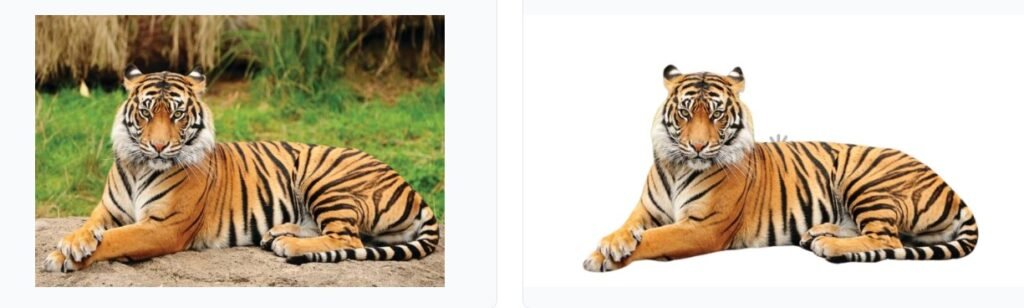
Remove Background from Image Online Free no Sign Up -Instant Editing
Remove Background from Image Online Free No Sign Up – Instant Editing is the fastest tool to erase backgrounds from any image in seconds. With just one click, you can make transparent backgrounds without downloading apps or creating an account. Try it instantly for profile photos, product images, social media posts, and professional designs.
Remove Image Background
Upload your image, remove the background, and customize with colors or images of your choice.
Background Remover Tool
Upload Your Image
Drag & drop your image here
or click to browse
Supported: JPG, PNG
- Maximum file size: 12 MB
- Best results with clear subject/background separation
- Processing typically takes 3-5 seconds
Original Image
Your original image will appear here
Customized Background
Your processed image will appear here
Customize Background
Transparent Background
The image will be saved with a transparent background, perfect for using in designs or overlaying on other content.
Download Options
Image Details:
- Format: --
- Dimensions: -- × --
- Size: --
Why Remove Image Backgrounds?
For E-commerce
Create clean, professional product images with consistent backgrounds for your online store.
For Social Media
Make eye-catching social media posts, profile pictures, and marketing materials.
For Graphic Design
Easily integrate images into designs, collages, and creative compositions.
For Personal Projects
Create custom wallpapers, greeting cards, and personalized photo edits.


Remove background from image online free no sign up
If you’ve ever tried to remove a background from an image manually, you already know how frustrating it can be. Zooming in, tracing carefully, erasing edges—it takes forever. Luckily, those days are gone. Today, you can remove image backgrounds online for free with just one click.
This guide will walk you through everything you need to know about using a Remove background from image online free no sign up, why it matters, who should use it, and how to get the best results—even if you’re not a designer.
Why Background Removal Is So Important Today
We live in a visual world. Whether you’re selling products, building a social media brand, or creating graphics, clean images with transparent backgrounds make everything look more professional.
A single good background removal tool can help you:
Create clean product photos for eCommerce
Remove messy or distracting backgrounds
Make beautiful profile pictures
Prepare images for thumbnails, logos, and banners
Edit photos faster without Photoshop
And the best part? You can do all of this online, for free, without installing any software.
What Is an Online Background Remover?
A background remover is an AI-powered tool that automatically detects the subject of a photo and removes the background around it.
Instead of manually cutting around edges, the tool analyzes colors, shapes, and outlines to isolate the main object.
In short:
Upload → AI removes the background → Download your clean PNG.
It really is that simple.
Remove Background from Image Online Free No Sign Up – Instant Editing allows users to quickly erase image backgrounds without installing software or creating an account. This free tool works directly in your browser and supports JPG, PNG, and WebP formats for instant transparent background results.
Who Needs a Background Remover Tool?
You’ll love using a background remover if you are:
1. Online Sellers
Platforms like Amazon, Flipkart, eBay, Etsy, and Shopify require clean product photos.
A transparent or solid white background boosts sales and improves brand trust. Foe best editing image use our Image cropping tool or Adobe. A global leader in photo editing and design
2. Content Creators & Influencers
Whether you’re making reels, posts, thumbnails, or banners, a clean cut-out image blends perfectly into any design.
3. Students & Teachers
Project presentations, banners, posters, and worksheets look more polished with clean images.
4. Graphic Designers & Freelancers
Save time on editing and focus on creativity instead of manual erasing.
5. Anyone Who Wants a Good Profile Picture
Remove photo distractions and place yourself on a clean or aesthetic background effortlessly.
Top Benefits of Using a Free Background Remover Image Online
Start using Remove Background from Image Online Free No Sign Up – Instant Editing today and create clean, professional images instantly—no signup, no downloads, and no watermarks.”
Here’s why online tools are better than complicated software:
✔ 1. Completely Free
No subscription. No credit card. No hidden fees.
Just upload and edit instantly.
✔ 2. No Software Required
Everything works in your browser—mobile or desktop.
✔ 3. Faster Than Manual Editing
AI detects edges with perfect accuracy—way faster than Photoshop.
✔ 4. High-Quality Transparent PNG Output
Get clean, crisp results suitable for professional use.
✔ 5. Beginner-Friendly
Even if you’ve never edited a photo before, you’ll get great results on your first try.
How to Use a Free Background Remover Online (Step-by-Step Guide)
Follow these easy steps to remove backgrounds instantly:
Step 1: Upload Your Image
Go to the background remover tool page and click Upload Image.
Step 2: Let AI Process the Photo
The tool uses advanced AI to detect the subject.
This takes only 1–2 seconds.
Step 3: Preview the Result
You’ll see your image with the background removed automatically.
Step 4: Make Adjustments (Optional)
You can:
Erase or restore details
Add a new background
Apply solid colors
Adjust smoothness
Step 5: Download Your Image
Download the final image in PNG or JPG format.
That’s it!
Your background-free image is ready to use in designs, product listings, or social media.
Pro Tips for Getting the Best Results
1. Use High-Quality Photos
Clear images with good lighting give the cleanest edges.
2. Focus on the Main Subject
Avoid images where the subject blends into the background.
3. Use PNG Format for Transparent Backgrounds
PNG keeps sharp edges and transparency.
4. Keep Hair and Soft Edges Clear
AI does a great job, but clean photos make it even better.
Popular Use Cases for Background remover online
1. Product Photography
Perfect for clothing, jewelry, electronics, cosmetics, and more.
2. YouTube Thumbnails
Cut out your face or a product to add to custom thumbnails.
3. Instagram Reels & Posts
Create standout visuals and polished edits.
4. Business Branding
Ideal for logos, banners, presentations, and ads.
5. ID Photos & Profile Pictures
Remove clutter and place yourself on a clean background.
Why This Tool Remove “background from image online free no sign up” Is Better Than Others
You get:
Fast one-click background removal
Clean AI-cut edges
No watermarks
No sign-up
Unlimited usage
Works on phone and PC
It’s built to give you professional results without needing advanced editing skills.
Common Mistakes to Avoid
❌ Uploading blurry photos
AI can’t separate the background well.
❌ Using very dark or low-light images
The subject blends in and edges may look rough.
❌ Uploading images with too many distractions
Busy backgrounds confuse AI.
❌ Not downloading in PNG
PNG is essential for transparent backgrounds.
Using a “Remove background from image online free no sign up” is one of the quickest ways to improve the quality of your images and designs. Whether you’re a seller, creator, business owner, or student, this tool helps you create clean and professional photos in seconds—without spending money or learning complex software.
Try it today and see how easy editing can be.