What Is the Advanced Federal and State Tax Calculator USA 2026?
Let's face it—tax season feels like navigating a maze blindfolded. Between federal brackets, state rates, deductions, and credits, it's enough to make anyone's head spin. That's exactly why we built this advanced federal and state tax calculator USA 2026—to take the guesswork out of your tax planning.
This isn't just another basic tax estimator. It's a comprehensive tool that crunches numbers for all 50 states, accounts for your filing status, factors in self-employment taxes, and even generates visual charts to show exactly where your money goes. Whether you're a W-2 employee or running your own show as a 1099 contractor, this calculator adapts to your situation.
Think of it as your personal tax advisor available 24/7, minus the hefty hourly fees. You'll see your federal tax liability, state obligations, Social Security, Medicare, and most importantly—your estimated refund or amount owed.
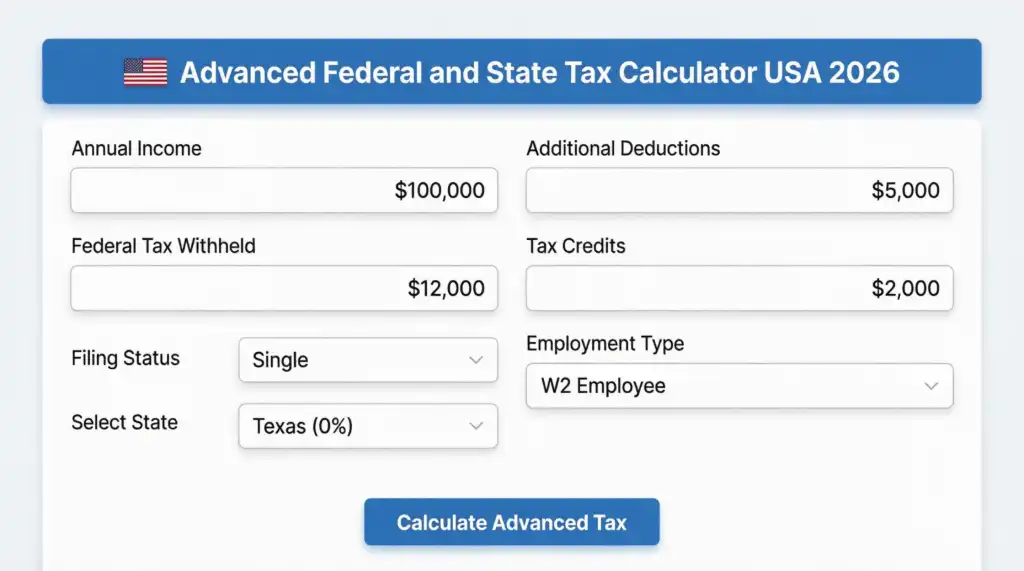
How to Use the Advanced Income Tax Calculator USA with Deductions 2026
Getting started takes less than two minutes. Here's your step-by-step walkthrough:
Enter Your Annual Income
Input your gross income before any taxes or deductions. This includes wages, salary, bonuses, and any other taxable income sources.
Input Federal Tax Withheld
Check your pay stubs or W-2 to see how much federal tax your employer already withheld throughout the year.
Choose Your Filing Status
Select from Single, Married Filing Jointly, or Head of Household. This dramatically affects your standard deduction and tax brackets.
Pick Your State
Choose from all 50 states. The calculator knows each state's tax rate—from Texas and Florida's 0% to California's 13.3% top rate.
Add Deductions & Credits
Enter itemized deductions (mortgage interest, charitable donations) and tax credits (child tax credit, education credits).
Select Employment Type
Are you a traditional W-2 employee or self-employed (1099)? Self-employed folks pay an additional 15.3% for self-employment tax.
Hit "Calculate Advanced Tax" and boom—you'll see a detailed breakdown with charts showing your income vs. taxes vs. net take-home pay. Plus, you can download everything as a PDF for your records or to share with your accountant.
Auto Loan Calculator with Credit Score USA
See how your credit score impacts your car loan rate, monthly payment, and total interest. Plan your purchase with confidence.
Try It Free →Powerful Features That Set This Calculator Apart
Comprehensive Tax Calculation Engine
Our detailed federal tax and state tax calculator USA 2026 doesn't just scratch the surface. It digs deep into every aspect of your tax situation:
📈 Visual Analytics & Charts
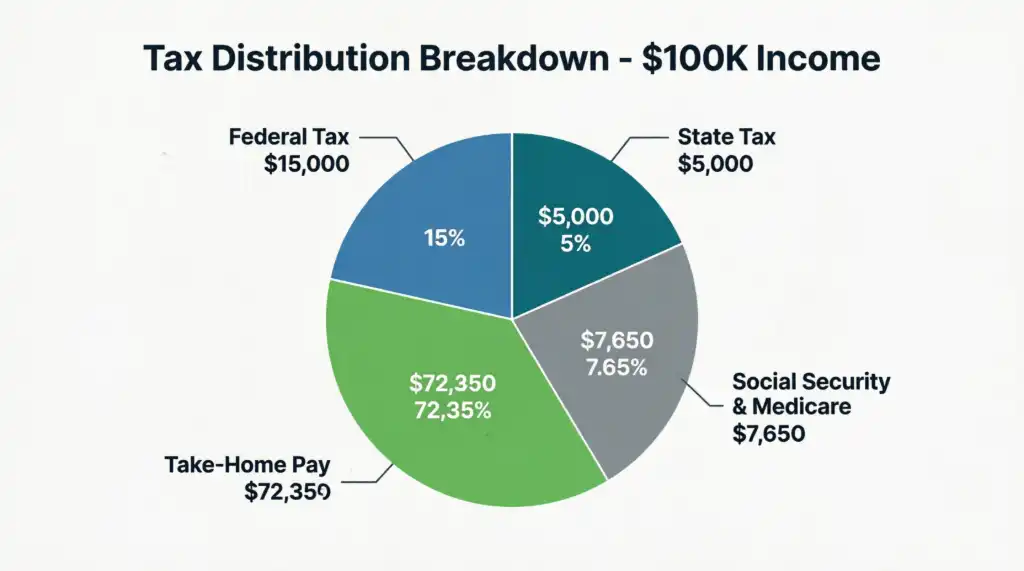
Numbers on a screen are one thing. Seeing them visualized? That's where the "aha!" moments happen. The calculator generates three different charts:
- Column Graph: Compare your gross income, total tax liability, and net income side-by-side
- Pie Chart: See the exact percentage breakdown between federal tax, state tax, and what you actually keep
- Line Chart: Track the journey from before-tax to after-tax income
🎯 State-Specific Accuracy
State taxes vary wildly. Living in Nevada or Alaska means zero state income tax. But if you're in New York, New Jersey, or California, you're looking at some of the highest state rates in the nation. This federal and state income tax estimator USA 2026 accounts for all of it automatically.
💼 Self-Employment Tax Support
Freelancers, gig workers, and small business owners—this one's for you. The self employment federal and state tax calculator USA 2026 feature automatically adds the 15.3% self-employment tax (covering both employer and employee portions of Social Security and Medicare) when you select "1099" as your employment type.
📄 PDF Report Generation
Need to show your spouse, business partner, or CPA? One click downloads a professional PDF report with all your calculations, perfect for tax planning meetings or keeping records throughout the year.
Advantages of Using This Advanced Tax Calculator
Save Hours of Manual Calculations
No more spreadsheet headaches or trying to remember which tax bracket you fall into. The tool does the heavy lifting instantly.
Avoid Costly Surprises
Discover if you'll owe money or get a refund before you file. This gives you time to adjust withholdings or set money aside.
Test Different Scenarios
What if you contribute more to your 401(k)? What if you move to a different state? Run unlimited scenarios to optimize your tax strategy.
Stay Updated with 2026 Tax Laws
The calculator reflects the latest IRS standard deductions and tax brackets for 2026, so you're always working with current data.
No Registration Required
Just like other trusted tools on toolxi.com, there's no signup, no email capture, no nonsense. Just pure functionality.
Mobile-Friendly Design
Calculate your taxes on your phone during your lunch break or on your tablet at home. It works seamlessly on any device.
Who Should Use This Federal and State Income Tax Estimator USA 2026?
Honestly? Almost anyone earning income in the United States can benefit. But here are the folks who'll get the most value:
🎯 W-2 Employees Planning Their Withholdings
Just got a raise? Changed your filing status? Had a baby? These life events change your tax situation. Use the calculator to see if you should adjust your W-4 form to avoid giving the government an interest-free loan (aka over-withholding) or owing a bunch at tax time.
🎯 Self-Employed Professionals & Gig Workers
If you're driving for Uber, freelancing on Upwork, or running an Etsy shop, taxes get complicated fast. The self employment federal and state tax calculator USA 2026 feature is a game-changer for 1099 workers who need to understand their full tax burden including that pesky 15.3% self-employment tax.
🎯 Small Business Owners
Whether you're an LLC, S-Corp, or sole proprietor, you need to know your personal tax liability from business income. Run scenarios to see how different business structures might affect your take-home pay.
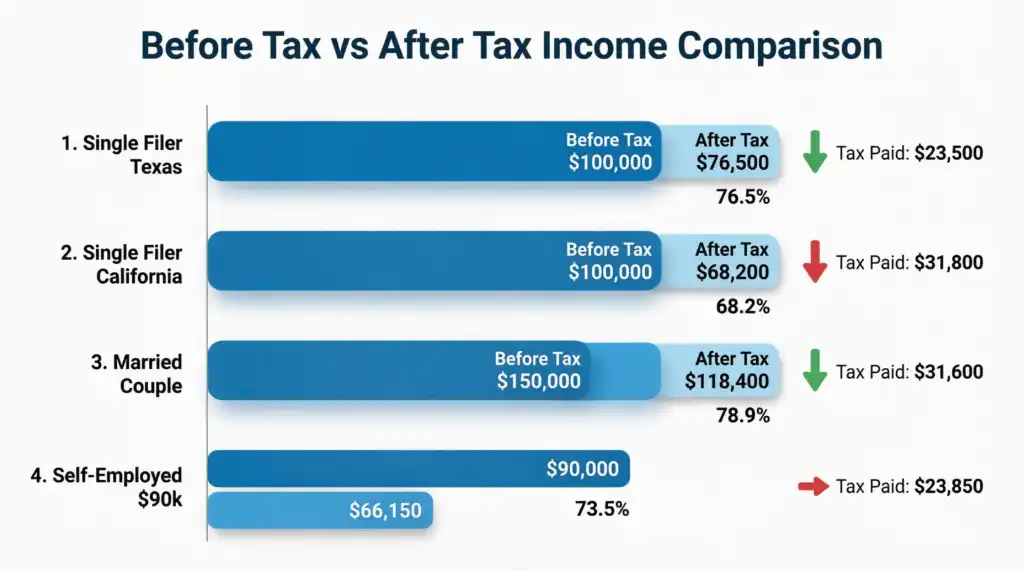
🎯 People Considering Relocation
Thinking about moving from high-tax California to no-income-tax Texas? Plug in your salary and see the real difference. A $100,000 job in Texas could mean $8,000+ more in your pocket compared to California when you factor in state taxes.
🎯 Retirement Planners
Wondering how much you can safely withdraw from your 401(k) without jumping into a higher tax bracket? This tool helps you model retirement income scenarios.
2026 Federal Tax Brackets & Standard Deductions
Understanding the numbers behind the calculator helps you make smarter financial decisions. Here's what's happening for the 2026 tax year:
Standard Deductions (2026)
- Single: $14,600
- Married Filing Jointly: $29,200
- Head of Household: $21,900
Federal Tax Brackets (Progressive System)
The U.S. uses a progressive tax system, meaning different portions of your income are taxed at different rates:
10% Bracket
Income from $0 to $11,000
12% Bracket
Income from $11,001 to $44,725
22% Bracket
Income from $44,726 to $95,375
24% Bracket
Income from $95,376 to $182,100
32% Bracket
Income from $182,101 to $231,250
35% Bracket
Income from $231,251 to $578,125
Additional Taxes to Consider
- Social Security: 6.2% on income up to $168,600 (wage base limit)
- Medicare: 1.45% on all income (no limit)
- Self-Employment Tax: 15.3% (covers both employer and employee portions)
Ready to Take Control of Your Taxes?
Stop wondering and start knowing. Use our free calculator today and get clarity on your 2026 tax situation in under 2 minutes.
Calculate My Taxes NowFrequently Asked Questions
Yes! Our calculator includes state tax rates for all 50 states plus Washington D.C. We account for states with no income tax (like Texas, Florida, Nevada, Alaska, South Dakota, Wyoming, and Washington) as well as high-tax states like California (up to 13.3%) and New York (up to 8.8%). The calculator applies the correct state rate based on your selection.
The 2026 tax year features updated standard deductions and tax brackets adjusted for inflation. The standard deduction increased to $14,600 for singles (up from $13,850 in 2024), $29,200 for married couples, and $21,900 for heads of household. Tax bracket thresholds also shifted upward, which could mean slight tax savings for many taxpayers.
Absolutely! When you select "Self-Employed (1099)" as your employment type, the calculator automatically adds the 15.3% self-employment tax, which covers both the employer and employee portions of Social Security (12.4%) and Medicare (2.9%). This is crucial for freelancers and independent contractors to understand their true tax liability.
Great question! Deductions reduce your taxable income (the amount subject to tax), while credits directly reduce your tax bill dollar-for-dollar. For example, a $5,000 deduction might save you $1,100 in taxes (if you're in the 22% bracket), but a $5,000 credit saves you the full $5,000. Our calculator handles both—deductions lower your taxable income, and credits reduce your final tax liability.
Yes! Simply add up all your taxable income sources—W-2 wages, 1099 income, interest, dividends, rental income, etc.—and enter the total as your "Annual Income." The calculator will compute your taxes on the combined amount. Just remember to select the employment type that represents your primary income source for the self-employment tax calculation.
The refund estimate is as accurate as the information you provide. It compares your total tax liability (what you owe) against your federal tax withheld (what you already paid through payroll deductions). If you withheld more than you owe, you'll get a refund. If you withheld less, you'll owe the difference. However, this doesn't account for every possible tax situation, so consider it a strong estimate rather than a guarantee.
Currently, the calculator supports three filing statuses: Single, Married Filing Jointly, and Head of Household. Married Filing Separately uses different tax brackets and isn't included in this version. If you're filing separately, you can use the "Single" status as a rough approximation, but we recommend consulting a tax professional for precise calculations in this situation.
This calculator includes state-level income taxes but doesn't account for local or city taxes (like New York City's local tax or Ohio's municipal taxes). If your city or locality charges income tax, you'll need to calculate that separately and add it to your total tax burden. The state tax shown is your state obligation only.
While the calculator doesn't have a built-in save feature, you can download your results as a PDF report by clicking the "Download PDF Report" button. This creates a professional document with all your calculations that you can save, print, or email. You can also take screenshots of the charts and results for your records.
Completely. Unlike many online tools, we don't store, transmit, or share any of your financial information. All calculations happen in your browser using JavaScript. Once you close the page, your data is gone. We don't require registration, don't collect emails, and don't track your inputs. Your privacy is paramount.
The current version calculates the standard 1.45% Medicare tax on all income. The Additional Medicare Tax of 0.9% (which applies to income over $200,000 for single filers or $250,000 for married couples) is not included in this calculator. If you earn above these thresholds, add 0.9% of the excess income to your total tax liability for a more complete picture.
This calculator is designed primarily for ordinary income (wages, salary, self-employment income). It doesn't separately calculate preferential tax rates for long-term capital gains and qualified dividends, which are taxed at 0%, 15%, or 20% depending on your income. For complex investment income situations, you may need specialized tax software or a CPA.
Yes! Self-employed individuals and those with significant non-withheld income should make quarterly estimated payments. Use the calculator to determine your total annual tax liability, then divide by 4 to get your quarterly payment amount. The IRS generally requires you to pay either 90% of your current year's tax or 100% of last year's tax (110% if income exceeds $150,000) to avoid penalties.
This is normal and expected! The U.S. uses a progressive tax system. If you're in the 24% bracket, only the income above $95,375 (for singles) is taxed at 24%. Your first $11,000 is taxed at 10%, income from $11,001-$44,725 at 12%, and so on. Your "effective tax rate" (total tax divided by total income) will always be lower than your top marginal bracket.
No, this calculator is designed for U.S. citizens and resident aliens filing standard Form 1040. Non-resident aliens file Form 1040-NR and have different tax rules, standard deductions (often $0), and tax treaties that affect their liability. If you're a non-resident alien, please consult IRS Publication 519 or a tax professional specializing in international taxation.
We update the calculator annually when the IRS releases new tax brackets and standard deductions, typically in late fall for the upcoming tax year. The 2026 version reflects the latest inflation-adjusted figures. We also make improvements based on user feedback throughout the year. Bookmark the page or check back each tax season for the most current version.
This calculator handles personal income tax, not business entity taxes. If you own an S-Corp or LLC that passes income through to your personal return, you can enter your distributive share of business income as part of your total annual income. However, it won't calculate business-level taxes, payroll taxes for employees, or complex partnership allocations. For business taxes, you'll need specialized business tax software.
No worries! Simply change any field and click "Calculate Advanced Tax" again. The calculator instantly updates all results and charts. You can run as many scenarios as you want—test different income levels, deduction amounts, or even compare different states if you're considering a move. There's no limit to how many times you can calculate.
Still Have Questions?
For more free financial tools and calculators, visit toolxi.com - your one-stop resource for smart financial planning tools.