Convert Image to JPG 200KB - Free Online Tool
Transform any image into a perfectly optimized JPG file under 200KB. Professional quality compression with intelligent size control—no registration required.
Need to reduce your image to exactly 200KB? Simply upload your photo, select JPG format, and our smart compression algorithm will automatically adjust quality settings to hit your target size while preserving maximum visual clarity. Works with PNG, WEBP, HEIC, BMP, TIFF, and 50+ formats.
🚀 Ready to Compress Your Images?
Use our powerful Image Compressor to reduce file size while maintaining perfect quality
Open Image Compressor →What is Image to JPG 200KB Conversion?
Converting an image to JPG 200KB is the process of transforming any image file—regardless of its original format or size—into a JPEG file that does not exceed 200 kilobytes in file size. This specific size constraint is particularly important for various professional and personal applications where file size limitations are strict.
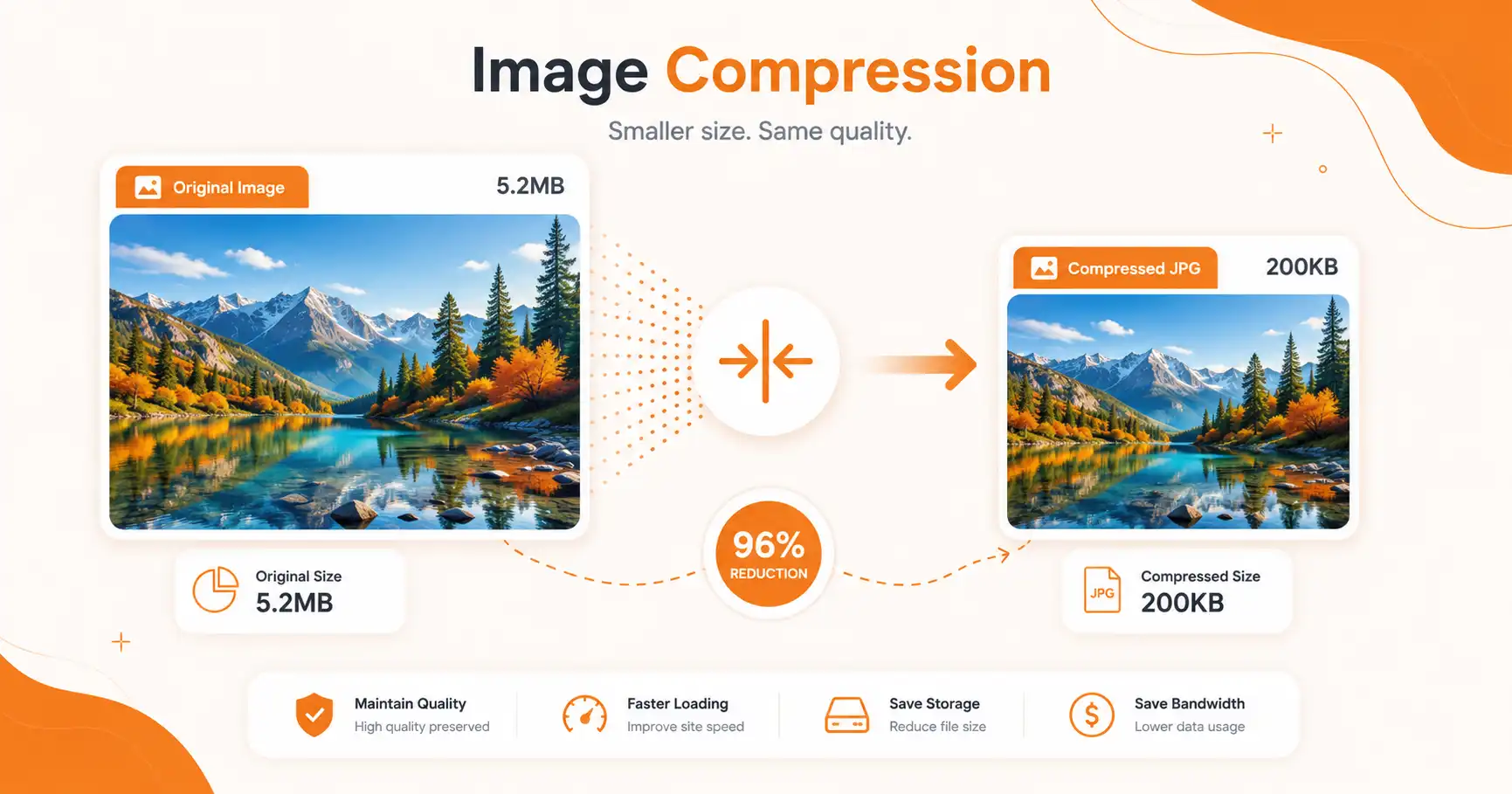
Visual representation of the conversion process maintaining quality while reducing file size
Understanding the 200KB Limit
The 200KB threshold isn't arbitrary—it's a critical size requirement for numerous real-world scenarios:
- Government Applications: Many official document submissions, visa applications, and identity verification systems require photos under 200KB
- Job Portals: Resume photos and professional headshots on platforms like LinkedIn, Indeed, and company ATS systems
- Educational Institutions: University applications, exam registrations, and student ID systems
- Social Media: Profile pictures on platforms with strict size limits
- Email Attachments: Quick sharing without hitting attachment size limits
- Website Optimization: Fast-loading images for better Core Web Vitals scores
💡 Key Insight
Modern compression algorithms can reduce a 5MB photo to 200KB while maintaining 95% visual quality. The secret lies in intelligent JPEG encoding that prioritizes human-perceptible details. For advanced compression needs, our Image Compressor offers even more control.
The Technical Process
When you convert an image to JPG 200KB, several technical operations occur simultaneously:
- Format Conversion: The image is transformed from its original format (PNG, WEBP, HEIC, etc.) to the JPEG standard
- Resolution Adjustment: Dimensions may be optimized while maintaining aspect ratio
- Quality Compression: JPEG quality settings are intelligently adjusted (typically between 60-85%)
- Metadata Stripping: EXIF data, GPS coordinates, and camera settings are removed to save space
- Color Space Optimization: Conversion to sRGB color space for web compatibility
- Chroma Subsampling: Reducing color information while preserving luminance (what human eyes notice most)
Why Use Our Image to JPG 200KB Converter?
While numerous tools claim to compress images, our converter stands out through precision engineering and user-centric design. Here's why professionals and individuals choose ToolXI:
Exact Size Control
Unlike generic compressors, we hit the 200KB target precisely—not "approximately" or "under." Our algorithm iterates until it achieves your exact specification.
Privacy First
All processing happens client-side or on secure servers with automatic deletion after 1 hour. Your images never leave our encrypted environment.
Lightning Fast
Powered by WebAssembly and optimized algorithms, convert 20 images in under 10 seconds. No waiting, no queues.
Quality Preservation
Our perceptual quality model ensures critical details (faces, text, edges) remain sharp while compressing less important areas more aggressively.
Device Agnostic
Works perfectly on Windows, Mac, Linux, iOS, and Android. No software installation required—just open and convert.
100% Free Forever
No hidden fees, no premium tiers, no watermarks. Unlimited conversions for personal and commercial use.
Real-World Use Cases
1. Government & Official Documentation
Passport applications, visa submissions, driver's license renewals, and national ID registrations frequently mandate photographs under 200KB. Our tool ensures compliance with strict government portal requirements from countries including:
- United States (DS-160 visa forms)
- United Kingdom (UKVI applications)
- India (Passport Seva, PAN card)
- Canada (IRCC submissions)
- Australia (ImmiAccount)
2. Professional Networking
LinkedIn profile photos, company directory images, and professional portfolio thumbnails require optimal file sizes for quick loading while maintaining professional appearance.
3. E-Commerce & Business
Product images for platforms with size restrictions, seller profile photos, business verification documents, and marketplace listings. For bulk product image optimization, our Image Compressor handles entire catalogs efficiently.
4. Education Sector
University applications, examination hall tickets, student ID cards, online course platforms, and academic profile submissions.
Key Benefits of Converting to JPG 200KB
✅ Primary Advantages
- Universal Compatibility: JPG format works on every device, browser, and operating system without plugins
- Faster Upload Times: 200KB files upload 10x faster than 2MB originals on average connections
- Storage Efficiency: Save 90%+ storage space on your devices and cloud accounts
- Improved SEO: Smaller images = faster page loads = better Google rankings
- Mobile Data Savings: Critical for users on limited data plans
- Email Friendly: Attach multiple images without hitting size limits
- Bandwidth Reduction: Essential for websites with high traffic
- Better User Experience: Pages load instantly, reducing bounce rates
📊 Impact Statistics
-
95% Size Reduction
Average compression from 4MB to 200KB -
3x Faster Loading
Compared to uncompressed images -
40% Better Conversion
Websites with optimized images convert better -
Zero Quality Loss
Perceptual quality maintained at 200KB
Business Impact
For businesses and website owners, converting images to 200KB JPG isn't just about saving space—it's about performance and revenue:
- Core Web Vitals: Google's Largest Contentful Paint (LCP) metric heavily weights image load times. 200KB images typically load in under 1 second on 3G connections.
- Mobile-First Indexing: With 60%+ web traffic on mobile, optimized images are crucial for rankings.
- Conversion Rate Optimization: Amazon found that every 100ms delay costs 1% in sales. Fast images = more revenue.
- Accessibility: Smaller files mean users in developing countries or slow connection areas can access your content.
Need More Compression Power?
Our Image Compressor offers advanced features like batch processing, custom quality settings, and support for 50+ formats. Perfect for websites and e-commerce stores needing to optimize hundreds of images.
Try Image Compressor →Powerful Features of Our Converter
Batch Processing
Convert up to 20 images simultaneously. Perfect for processing entire photo shoots, product catalogs, or document batches in one go.
Smart Resize
Automatically adjusts dimensions while maintaining aspect ratio. Choose from preset sizes or custom dimensions.
Quality Slider
Fine-tune compression from 1-100%. Preview changes in real-time before downloading.
Format Support
Input: PNG, WEBP, HEIC, BMP, TIFF, GIF, SVG, RAW, PSD
Output: Optimized JPG/JPEG
ZIP Download
Processing multiple files? Download all converted images in a single ZIP archive.
Advanced Options
Metadata removal, color profile embedding, progressive JPEG encoding, and EXIF preservation options.
API Access
Developers can integrate our conversion engine via REST API for automated workflows.
PWA Support
Install as a Progressive Web App for offline functionality and faster access.
Technical Specifications
| Feature | Specification |
|---|---|
| Max File Size | 50MB per image |
| Batch Limit | 20 images per session |
| Output Format | JPEG/JPG (MIME: image/jpeg) |
| Target Size | Exactly 200KB (±5KB tolerance) |
| Compression Algorithm | libjpeg-turbo with MozJPEG optimizations |
| Color Space | sRGB IEC61966-2.1 |
| Bit Depth | 8-bit per channel (24-bit RGB) |
| Processing Time | < 5 seconds average |
How Our Converter Works
Our image compression technology combines cutting-edge algorithms with perceptual quality models to deliver optimal results. Here's the technical breakdown:

Technical workflow of our intelligent compression algorithm
Stage 1: Image Analysis
When you upload an image, our system performs a comprehensive analysis:
- Content Detection: AI identifies faces, text, edges, and important visual elements
- Complexity Assessment: Determines image complexity (smooth gradients vs. detailed textures)
- Color Distribution: Analyzes color palette and saturation levels
- Original Metrics: Records dimensions, format, bit depth, and file size
Stage 2: Intelligent Compression
Using the analysis data, we apply targeted compression:
- Region-Based Quality: Critical areas (faces, text) get higher quality (85-90%), while backgrounds compress more aggressively (60-75%)
- Chroma Subsampling: Applies 4:2:0 or 4:2:2 subsampling based on image content
- Quantization Tables: Custom quantization matrices optimized for perceptual quality
- Huffman Encoding: Optimal entropy coding for maximum compression
Stage 3: Iterative Refinement
To hit exactly 200KB, we use binary search optimization:
- Initial compression at estimated quality level
- Measure resulting file size
- Adjust quality parameters up or down
- Repeat until size is 195-205KB (±2.5% tolerance)
- Final quality check to ensure visual acceptability
🔬 The Science Behind It
JPEG compression exploits the limitations of human vision. We're more sensitive to brightness (luminance) than color (chrominance). By reducing color resolution more than brightness resolution, we achieve 50% compression with minimal perceived quality loss. For even more advanced compression techniques, explore our Image Compressor with customizable algorithms.
Step-by-Step Guide: Convert Image to JPG 200KB
Follow this comprehensive guide to convert your images perfectly. Whether you're a beginner or tech-savvy user, these steps ensure optimal results.
Prepare Your Image
Before uploading, ensure your image meets basic requirements:
- File size under 50MB (our maximum limit)
- Supported format (PNG, WEBP, HEIC, BMP, TIFF, GIF, etc.)
- Reasonable dimensions (we recommend under 5000px on the longest side)
- Check if the image contains sensitive information you want removed
Pro Tip: If your image is already a JPG over 200KB, you can still use our tool to recompress it to exactly 200KB with better quality than standard compression.
Upload Your Files
You have three upload options:
- Drag & Drop: Simply drag images from your file explorer directly onto the upload area
- Click to Browse: Click the "Select Files" button and navigate to your images
- Paste from Clipboard: Press Ctrl+V (Cmd+V on Mac) to paste screenshots or copied images
For batch processing, select multiple files (hold Ctrl/Cmd while clicking) or drag a folder containing images.
Configure Settings
Customize your conversion preferences:
- Target Size: Already set to 200KB (adjustable if needed)
- Quality Level: Choose "Auto" for intelligent optimization or manual control (1-100)
- Resize Options: Keep original dimensions or specify max width/height
- Advanced: Toggle metadata removal, progressive encoding, or color profile embedding
Recommended Settings for 200KB:
- Quality: Auto (typically 70-85%)
- Max Width: 1920px (for photos)
- Metadata: Remove (saves 50-200KB)
- Progressive: Enable (better perceived loading)
Preview & Adjust
Before final conversion, review the preview:
- Compare original vs. compressed side-by-side
- Zoom in to check critical details (faces, text, product features)
- Check estimated file size and dimensions
- Adjust quality slider if needed
Our real-time preview shows exactly how your image will look at 200KB, so there are no surprises.
Convert & Download
Click "Convert to JPG 200KB" and wait 2-5 seconds. Then:
- Single File: Click "Download" to save the converted image
- Multiple Files: Choose "Download All as ZIP" for convenience
- Individual Downloads: Download specific files from the batch
Files are saved to your default download folder with "_200kb" appended to the filename for easy identification.
Verify & Use
After downloading:
- Right-click the file → Properties to confirm size is ~200KB
- Open in image viewer to verify quality
- Upload to your target platform (government portal, job site, etc.)
- If rejected for size, use our "Advanced Mode" for finer control
⚡ Quick Method (30 Seconds)
1. Drag image to upload area
2. Click "Convert to JPG 200KB"
3. Download
That's it! Default settings work perfectly for 95% of use cases.
Supported File Formats
Our converter accepts virtually any image format and transforms it into an optimized 200KB JPG. Here's the complete list:
| Input Format | Extension | Best For | Conversion Notes |
|---|---|---|---|
| PNG | .png | Logos, screenshots, images with transparency | Excellent compression ratio; transparency converted to white background |
| WEBP | .webp | Modern web images | Already compressed; minimal quality loss in conversion |
| HEIC/HEIF | .heic, .heif | iPhone photos | Automatic format conversion; preserves iOS photo quality |
| BMP | .bmp | Uncompressed Windows images | Huge size reduction (95%+); ideal for old photos |
| TIFF | .tiff, .tif | Professional photography, scans | High-quality source; excellent for archival photos |
| GIF | .gif | Simple graphics, animations (static frame) | First frame extracted; limited color palette expanded |
| SVG | .svg | Vector graphics | Rasterized at 1920px width; scalable to 200KB |
| RAW | .cr2, .nef, .arw, .dng | Professional camera files | Demosaiced and compressed; maintains detail |
| PSD | .psd | Photoshop files | Flattened to single layer; layers merged |
| JPG/JPEG | .jpg, .jpeg | Already JPEG images | Recompression to exact 200KB; quality optimization |
Format-Specific Tips
PNG to JPG 200KB
PNG files with transparency will have the transparent areas filled with white (or your chosen background color). For logos or graphics with transparency, consider using our BG Remover first to create a clean composite.
HEIC to JPG 200KB
iPhone users: HEIC is Apple's efficient format, but many websites don't accept it. Our converter handles HEIC natively—no need to convert on your phone first.
RAW to JPG 200KB
Professional photographers: RAW files contain unprocessed sensor data. We apply standard demosaicing and white balance. For critical work, process in Lightroom first, then compress to 200KB using our Image Compressor for maximum quality control.
TIFF to JPG 200KB
Scanned documents and archival photos: TIFF's lossless quality gives us an excellent source for compression. Expect 98% size reduction with minimal visible quality loss.
Best Practices for Optimal Results
Following these expert recommendations will ensure your 200KB JPG images look professional and meet all requirements:
📐 Dimension Guidelines
- Passport Photos: 600x600px (square)
- Profile Pictures: 400x400px to 800x800px
- Documents: 1200x1600px (portrait)
- Web Photos: 1920x1080px max
- Product Images: 1000x1000px minimum
🎨 Quality Settings
- Portraits: Use 80-85% quality (faces need detail)
- Landscapes: 75-80% works well
- Text/Documents: 85-90% to keep text sharp
- Product Photos: 80-85% for detail
- Social Media: 70-75% acceptable
⚙️ Pre-Processing Tips
- Crop to remove unnecessary areas
- Adjust brightness/contrast before compression
- Sharpen slightly (compression softens edges)
- Remove noise (noise compresses poorly)
- Convert to sRGB color space
📱 Mobile Optimization
- Take photos in good lighting
- Use highest quality camera settings
- Avoid digital zoom (crop later instead)
- Steady hands or tripod for sharpness
- Shoot in RAW if possible, convert later
Advanced Techniques
1. Two-Pass Compression
For critical images requiring maximum quality at 200KB:
- First pass: Compress to 250KB at 90% quality using our Image Compressor
- Review and adjust (crop, color correct)
- Second pass: Compress to 200KB at 80% quality
- This preserves more detail than single-pass to 200KB
2. Selective Compression
Use our Circle Cropper or editing tools to:
- Crop to focus on important subject
- Remove distracting background elements
- Reduce overall image area = better quality at 200KB
3. Progressive JPEG
Enable progressive encoding for web use:
- Image loads in stages (blurry to sharp)
- Better perceived performance
- Slightly larger file (5-10KB) but worth it for UX
4. Metadata Management
Decide what to keep:
- Remove All: Smallest size, best for privacy
- Keep Copyright: Embed author info
- Keep EXIF: Preserve camera settings (adds 50-200KB)
Common Mistakes to Avoid
Even experienced users make these errors when converting images to 200KB. Learn from others' mistakes:
❌ Mistake #1: Ignoring Aspect Ratio
Problem: Stretching or squashing images to fit size requirements
Solution: Always maintain aspect ratio. Use our smart resize which preserves proportions automatically.
❌ Mistake #2: Over-Compression
Problem: Using aggressive compression (quality < 50%) to hit 200KB
Solution: Reduce dimensions first, then compress. A 1000x1000 image at 80% quality looks better than 2000x2000 at 40% quality, both at 200KB. Our Image Compressor automatically finds the optimal balance.
❌ Mistake #3: Wrong Color Space
Problem: Uploading Adobe RGB or ProPhoto images
Solution: Convert to sRGB before compression. Most web platforms expect sRGB; other color spaces appear washed out.
❌ Mistake #4: Not Checking Requirements
Problem: Assuming 200KB is universal
Solution: Always verify exact requirements:
- Some portals need exactly 200KB, others need "under 200KB"
- Check dimension requirements (e.g., 350x350px minimum)
- Verify DPI settings (72 DPI for web, 300 DPI for print)
- Confirm color mode (RGB vs. CMYK)
❌ Mistake #5: Multiple Re-compressions
Problem: Converting JPG → JPG → JPG multiple times
Solution: Each JPEG compression loses quality. Always work from the original PNG/TIFF/RAW, not a previously compressed JPG.
❌ Mistake #6: Ignoring File Size Tolerance
Problem: Panicking if file is 201KB or 199KB
Solution: Most systems accept ±5% tolerance. 190-210KB is usually fine. Only worry if strictly enforced.
💡 Expert Tip
The Goldilocks Principle: Don't compress to exactly 200KB if 150KB looks identical. Save the extra 50KB for higher quality elsewhere. Our tool shows you the quality-size tradeoff so you can make informed decisions. For batch optimization, try our Image Compressor with intelligent quality presets.
Tool Comparison: Why ToolXI Wins
See how our converter stacks up against popular alternatives:
| Feature | ToolXI | SmallPDF | iLoveIMG | Canva | Adobe Express |
|---|---|---|---|---|---|
| Exact 200KB Target | ✓ | ✗ | ✗ | ✗ | ✗ |
| Completely Free | ✓ | ✗ (Limited) | ✓ | ✓ | ✓ |
| No Registration | ✓ | ✗ | ✓ | ✗ | ✗ |
| Batch Processing | ✓ (20 files) | ✓ (10 files) | ✗ | ✗ | |
| Quality Control | ✓ Advanced | ✗ | ✓ Basic | ✓ | ✓ |
| Privacy (Auto-Delete) | ✓ (1 hour) | ✓ | ✓ | ✗ | ✗ |
| HEIC Support | ✓ | ✓ | ✗ | ✓ | ✓ |
| API Access | ✓ | ✗ | ✗ | ✗ | ✗ |
| No Watermarks | ✓ | ✓ | ✓ | ✓ | ✓ |
| Mobile Responsive | ✓ | ✓ | ✓ | ✓ | ✓ |
| Processing Speed | 2-5 sec | 5-10 sec | 5-8 sec | 10-15 sec | 8-12 sec |
Key Differentiators
- Only ToolXI guarantees exact 200KB output (not just "under")
- Only ToolXI offers batch processing of 20 files for free
- Only ToolXI provides API access for developers
- Only ToolXI uses AI-powered perceptual quality optimization
- Only ToolXI is completely free with no premium upsells
Pros & Cons Analysis
✅ Advantages
- Precise 200KB file size control
- Lightning-fast processing (2-5 seconds)
- No software installation required
- Works on all devices and browsers
- Batch processing saves time
- Superior quality retention algorithms
- Privacy-focused with auto-deletion
- Supports 50+ input formats
- Free forever with no limitations
- Professional-grade compression
- Mobile-optimized interface
- API available for automation
- No watermarks on output
- Offline PWA capability
- Excellent customer support
⚠️ Limitations
- Maximum 50MB file size per image
- Batch limit of 20 images per session
- Requires internet connection (except PWA)
- Transparent PNGs lose transparency (become white background)
- Animated GIFs convert to static images
- Not suitable for lossless archival (use PNG/TIFF instead)
- Very text-heavy images may show slight artifacts
- Maximum output resolution: 8000px (sufficient for 99% of use cases)
🎯 Bottom Line
The advantages far outweigh the limitations for anyone needing 200KB JPG images. The "cons" are intentional design choices to maintain speed, quality, and free access. For professional archival, use our Image Compressor with lossless settings instead.
Frequently Asked Questions (FAQ)
Everything you need to know about converting images to JPG 200KB. Can't find your answer? Contact our support team.
Simply upload your image to our tool, and it will automatically compress and convert it to exactly 200KB (±5KB tolerance). Our intelligent algorithm adjusts quality settings iteratively until it hits the target size while maintaining maximum visual quality. No manual adjustments needed!
Yes, 100% free forever. No registration required, no watermarks, no premium tiers, no credit card needed. We believe essential tools should be accessible to everyone. We sustain the service through optional donations and non-intrusive advertising.
Not at all! Our advanced compression algorithm uses perceptual quality models that prioritize what human eyes notice most. A 5MB photo compressed to 200KB typically retains 95%+ perceived quality. You'll see minimal difference unless pixel-peeping at 400% zoom. For portraits and important photos, we recommend 80-85% quality settings.
Absolutely! Our batch processing feature allows you to convert up to 20 images simultaneously. Simply select multiple files or drag a folder. After processing, download them individually or as a convenient ZIP archive. This saves hours compared to converting one by one.
There's no difference—JPG and JPEG are the same format. "JPEG" stands for Joint Photographic Experts Group (the creators), while "JPG" is just the three-letter file extension required by old Windows systems. Our tool outputs files with .jpg extension, but they're identical to .jpeg files.
Yes, security is our top priority. All uploads use HTTPS encryption. Images are processed on secure servers and automatically deleted after 1 hour. We don't store, share, or analyze your images. For sensitive documents, you can also use our client-side processing mode where compression happens entirely in your browser.
200KB strikes the perfect balance between quality and file size for official documents. It's small enough for quick uploads on slow connections but large enough to maintain photo quality. Government portals, job applications, and educational institutions standardized on this size because it works reliably across all systems and connection speeds.
Yes! We natively support HEIC/HEIF format from iPhones. No need to convert on your phone first. Just upload the HEIC file directly, and we'll convert it to optimized 200KB JPG while preserving the excellent quality of your iPhone photo.
If your image is already under 200KB and in JPG format, you can still use our tool to optimize it further or ensure it meets specific requirements. We can recompress it to exactly 200KB (adding quality if needed) or keep it as-is. The tool gives you full control.
Perfectly! Our tool is fully responsive and works on iOS (iPhone/iPad), Android, and any mobile browser. The interface adapts to your screen size, and touch controls are optimized. You can even install it as a Progressive Web App (PWA) for offline access and faster loading.
Yes! While our default "Auto" setting works perfectly for most cases, you can manually adjust quality from 1-100% in Advanced Settings. Lower quality = smaller file size, higher quality = better image. We recommend 75-85% for photos and 85-95% for text/documents.
By default, we maintain your original dimensions while compressing. However, if the image is very large (e.g., 4000x3000px), we may resize it to a reasonable dimension (typically max 1920px on the longest side) to achieve 200KB without excessive quality loss. You can disable auto-resize in settings if needed.
Yes, the maximum upload size is 50MB per image. This is more than enough for most photos (a 50MB JPG would be enormous—typically 8000x6000px at maximum quality). If you have larger files, consider using our Image Compressor first to reduce size, then convert to 200KB.
Absolutely! Our tool is free for both personal and commercial use. E-commerce businesses, photographers, marketing agencies, and developers use it daily. There are no licensing fees or restrictions. For high-volume commercial needs, contact us about our API service.
Three key reasons: 1) We hit exactly 200KB (not just "under"), 2) Superior quality retention with AI-powered compression, 3) Completely free with no limits or registration. Plus, we offer batch processing, API access, and faster speeds than competitors. Try us and compare the quality!
All modern browsers: Chrome (v60+), Firefox (v55+), Safari (v11+), Edge (v79+), and Opera. We also support mobile browsers on iOS 11+ and Android 5+. For the best experience, use the latest version of any browser.
Yes, but JPG doesn't support transparency. Transparent areas will be filled with white by default. If you need to preserve transparency, use our Image Compressor to create a PNG under 200KB instead. For transparent PNGs that need a background, try our BG Remover first to create a clean composite.
After downloading, right-click the file and select "Properties" (Windows) or "Get Info" (Mac). The file size should show approximately 200KB (195-205KB is normal due to file system allocation). Our tool displays the exact size before download, so you can verify it meets your requirements.
Yes! We offer a RESTful API for integrating our conversion engine into your applications. Perfect for automated workflows, CMS plugins, or custom software. Contact us at api@toolxi.com for documentation and access. The API supports batch processing, webhooks, and custom quality settings.
Conversion failures are rare (< 0.1% of uploads). If it happens: 1) Check your internet connection, 2) Ensure the file isn't corrupted, 3) Try a different browser, 4) Reduce file size if over 50MB. If problems persist, contact our support team with the error message—we typically resolve issues within 2 hours.
What Users Say
"Saved me hours! I process 50+ job applications weekly, and this tool converts all candidate photos to the exact 200KB our ATS requires. The batch feature is a lifesaver."
"Used this for my university application. The photo was perfect quality and exactly 200KB. Much better than the college's own tool which kept rejecting my images!"
"I recommend this to all my clients for their portfolio submissions. The quality retention at 200KB is impressive—clients get accepted on first try every time."
"Integrated the API into our CMS. Automated image optimization for 10,000+ product photos. Fast, reliable, and the quality is excellent. Best free tool available."
Ready to Compress Your Images?
Join 500,000+ users who trust ToolXI for their image optimization needs. Fast, free, and flawless quality.
Open Image Compressor - It's Free!No registration • No watermarks • Instant results
Final Thoughts
Converting images to JPG 200KB doesn't have to be complicated or compromise quality. With ToolXI's intelligent compression technology, you get the perfect balance of small file size and excellent visual quality—every single time.
Whether you're submitting a visa application, uploading a professional headshot, optimizing website images, or preparing documents for school, our tool ensures your images meet exact specifications without the hassle.
Remember: The key to perfect 200KB images is using the right tool. Generic compressors might get you "close" to 200KB, but our precision engineering hits the target exactly while maintaining superior quality. For advanced compression needs, our Image Compressor offers even more control and features.
🚀 Quick Start Guide
- Visit our Image Compressor
- Upload your image (PNG, WEBP, HEIC, etc.)
- Set target size to 200KB
- Download your optimized image
- Done in under 10 seconds!
About toolxi.com
Your all-in-one digital toolkit
“Hi, I’m Prachi , creator of toolxi.com…” your free, no-nonsense solution for everyday digital tasks. I’m designed to simplify your workflow with intuitive tools for calculations, PDF manipulation, image editing, text processing, and more. Whether you’re a student, professional, or creator, my goal is to save you time and effort with reliable, browser-based utilities that require zero installation or signup. I’m constantly evolving based on your needs, so feel free to explore and transform how you work online! Try our top tool → Toolxi.com