Character Count in Word-2025 - Free
Character Count in Word helps you instantly check the total number of characters in your text, including spaces, paragraphs, and symbols for writing and SEO needs.
1. Why Character Count in Word is important ?
- Discuss common use-cases:
- Submitting essays or papers with strict limits.
- Social media posts (e.g. Essey, SEO, Twitter).
- SEO content writing.
- Publishing platforms with text restrictions.
2. How to Count Characters in Word ?

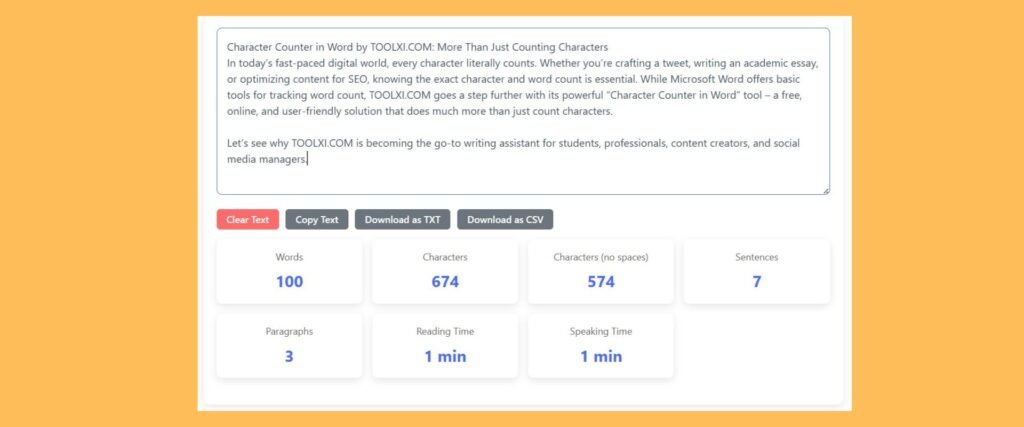
Type or Paste Your Text in Colom You can see Number of
- WORD
- CHARACTERS
- CHARATERS with no spaces
- SENTENCES
- PARAGRAPHS
- READING TIMES
- SPEAKING TIME

3. What does the word count box show?
Briefly and clearly explain each metric:
a. Words
The total number of words in the document or selection.
b. Characters
The total characters, including spaces.
c. Characters (without spaces)
Useful for platforms that don’t count spaces (e.g., some SMS services or forms).
d. Sentences
Good for readability, writing style analysis.
e. Paragraphs
Helps with structure and formatting.
f. Reading Time
This tool counts the words in your text to help estimate how long it will take to read .
g. Speak Time
Enter your text to get an accurate estimate of how long it will take to speak..
In today’s fast-paced digital world, every character literally counts. Whether you’re crafting a tweet, writing an academic essay, or optimizing content for SEO, knowing the exact character and word count is essential. While Microsoft Word offers basic tools for tracking word count, TOOLXI.COM goes a step further with its powerful “Character Counter in Word” tool – a free, online, and user-friendly solution that does much more than just count characters.
Let’s see why TOOLXI.COM is becoming the go-to writing assistant for students, professionals, content creators, and social media managers.
What Is the “Character Counter in Word” Tool on TOOLXI.COM?.
Character Counter in Word is a free online tool that instantly analyzes your text and provides detailed insights beyond just the number of characters and words. Simply paste or type your content into the tool, and it does the rest – no downloads, no registration, no hassle.
It includes:
Word count
Character count (with and without spaces)
Sentence and paragraph count
Grammar and spelling check
Keyword density analysis
Case converter
Social media character limit comparison
✨ Key Features of TOOLXI.COM’s Character Counter in Word
1. Character & Word Count
Instantly shows:
Characters with spaces
Characters without spaces
Word count
Sentence and paragraph count
Ideal for anyone writing content with specific length restrictions—think social media, academic assignments, or job applications.
2. Grammar and Spelling Checker
Highlights spelling errors and grammar issues in real time.
Offers suggestions for clarity, punctuation, and style.
Helps ensure your writing is professional and polished—perfect for emails, resumes, blogs, and essays.
3. Keyword Density Analyzer
Automatically detects and analyzes the frequency of keywords used in your content.
Great for:
SEO optimization
Blog writing
Website copy
Helps maintain the right balance: not too little, not too much—ideal for avoiding keyword stuffing.
4. Case Converter Tool
One-click conversion of text:
UPPERCASE
lowercase
Title Case
Sentence case
Perfect for formatting titles, social media captions, headings, or when correcting accidentally typed text in all caps.
5. Social Media Character Limits Preview
Instantly compare your text against platform-specific character limits like:
Twitter (280 characters)
Instagram Captions
LinkedIn Posts
Facebook
YouTube Descriptions
Makes social content creation smoother and helps avoid awkward text trimming
Reading & Speaking Time Estimates
Automatically calculates how long your content will take to:
Read (average: 200-250 words per minute)
Speak (average: 130-150 words per minute)
Excellent for presentations, podcasts, scripts, and speeches.
🌐 Accessible Anywhere, Anytime
No installation required
Works seamlessly on:
Desktop
Tablet
Mobile
All you need is an internet connection and a browser.
🚀 Who Is This Tool Perfect For?
Students: For essays and assignments with strict word limits
Content Writers: For SEO-optimized blogs and web pages
Marketers: For polished email copy and ad text
Social Media Managers: For platform-specific length and formatting
Freelancers & Job Seekers: For clear, grammatically correct resumes and cover letters
✅ Final Thoughts
If you’re still relying solely on Microsoft Word to check your character or word count, you’re missing out. The Character Counter in Word tool on TOOLXI.COM gives you a complete writing assistant, helping you improve clarity, optimize for SEO, and hit the right tone and format—without leaving your browser.
🔗 Try it now on TOOLXI.COM — it’s fast, free, and incredibly useful
📌 FAQ for Character Count in Word
❓ How to check character count in Word document?
You can check character count in a Word document by using the built-in Word count feature or an online Character Count in Word tool for faster and more accurate results.
❓ How do I find character count in Word with spaces and without spaces?
Microsoft Word shows characters with spaces, but our Character Count in Word tool displays both with-spaces and without-spaces counts clearly for precise usage.
❓ Is there an online tool to count characters in Word text?
Yes, Toolxi offers a free online tool to count characters in Word text instantly without uploading files or installing any software.
❓word character count for seo and academic writing?
Word character count is essential for SEO and academic writing to meet content limits, meta description lengths, and submission guidelines accurately.
❓ Can I get exact character count in Word for paragraphs?
Yes, this Character Count in Word tool allows you to get the exact character count for paragraphs, sentences, or selected text easily.
❓ Does this Character Count in Word tool support long documents?
Yes, the Character Count in Word tool can handle long documents, articles, and essays without any limit, making it suitable for professional and academic use.
❓ Can I use this character count tool for Microsoft Word alternatives?
Yes, this tool works with text copied from Microsoft Word, Google Docs, LibreOffice, and other word processors.
❓ Is the character count result 100% accurate?
Yes, Toolxi’s Character Count in Word tool provides exact and reliable character counts, including symbols, punctuation, and line breaks.
❓ Do I need to upload my Word file to count characters?
No, you don’t need to upload any files. Simply paste your text into the tool to check the character count instantly.
❓ Can this tool count characters for meta descriptions and SEO titles?
Yes, this character count tool is ideal for checking SEO meta descriptions, page titles, and snippet length limits.
❓ Does this tool count special characters and punctuation?
Yes, all special characters, punctuation marks, and symbols are included in the character count results.
❓ Can students use this tool for assignments and exams?
Absolutely. Students can use the Character Count in Word tool to meet assignment character limits and formatting requirements.
❓ Is Toolxi’s character count tool mobile-friendly?
Yes, the tool works smoothly on mobile phones, tablets, and desktops without any compatibility issues.
❓ Can I check character count for multiple paragraphs at once?
Yes, you can paste multiple paragraphs, and the tool will calculate the exact character count in Word-style formatting.
❓ Is this Character Count in Word tool free to use?
Yes, Toolxi offers this tool completely free with unlimited usage and no registration required.

About toolxi.com
Your all-in-one digital toolkit
“Hi, I’m Prachi , creator of toolxi.com…” your free, no-nonsense solution for everyday digital tasks. I’m designed to simplify your workflow with intuitive tools for calculations, PDF manipulation, image editing, text processing, and more. Whether you’re a student, professional, or creator, my goal is to save you time and effort with reliable, browser-based utilities that require zero installation or signup. I’m constantly evolving based on your needs, so feel free to explore and transform how you work online! Try our top tool → Toolxi.com