Never Miss a Split Second With Toolxi Stopwatch With Lap
Whether you’re training for a marathon, timing study sessions, tracking work productivity, or measuring performance during sports activities, a stopwatch with lap helps you capture every important interval without stopping the overall timer.
At Toolxi, we’ve built a powerful online stopwatch designed for accuracy, simplicity, and advanced lap tracking. Unlike traditional stopwatches, Toolxi provides detailed lap analysis, session tracking, and performance insights to help you make better decisions based on real timing data.
What Is a Stopwatch With Lap?
A stopwatch with lap is a timing tool that allows you to record intermediate times (laps or splits) while the main stopwatch continues running.
Example:
Imagine you’re running 5 kilometers:
- Lap 1 = First kilometer time
- Lap 2 = Second kilometer time
- Lap 3 = Third kilometer time
- Lap 4 = Fourth kilometer time
- Lap 5 = Final kilometer time
Instead of stopping the timer after every kilometer, you simply press the Lap button and continue timing your entire run.
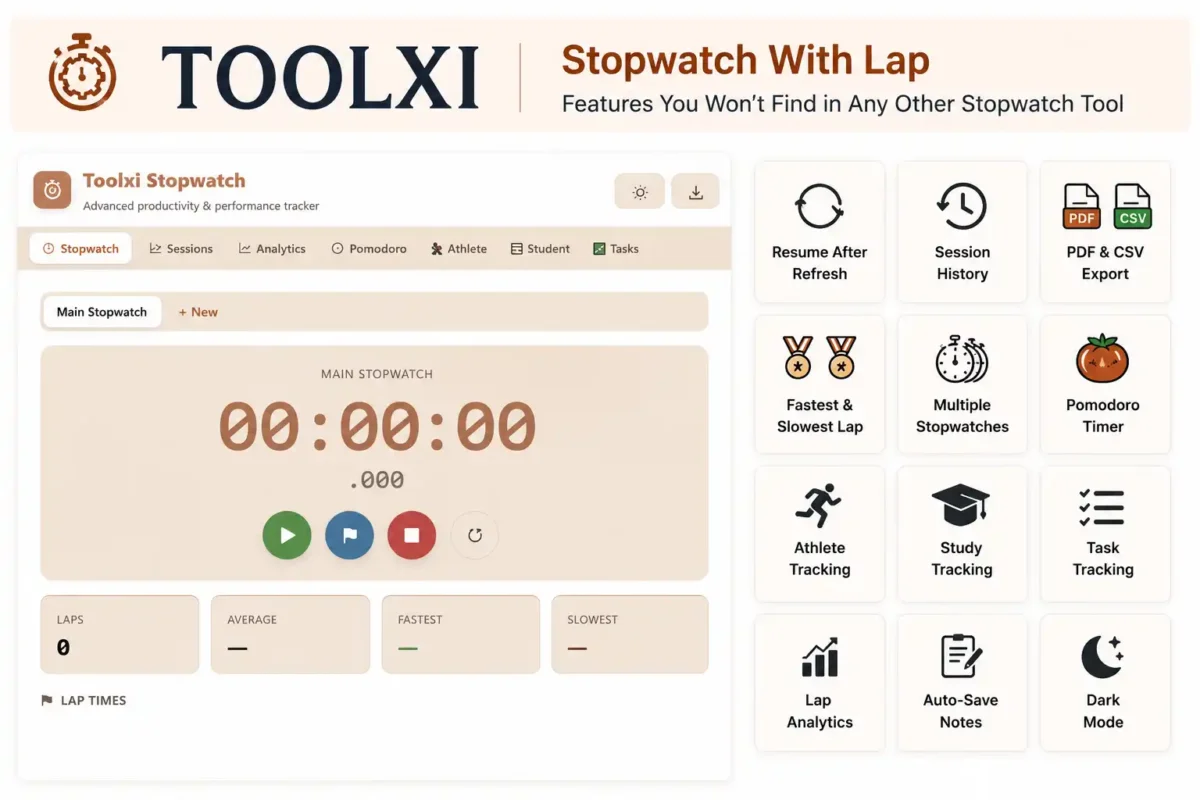
Quick Benefits
- Measure intervals without stopping the timer
- Track performance improvements
- Analyze fastest and slowest segments
- Improve productivity and efficiency
- Monitor workouts and training sessions
Toolxi Stopwatch With Lap Tool
Tool Demo Experience
Using Toolxi Stopwatch is incredibly simple:
- Click Start
- Begin your activity
- Press Lap whenever you want to record a split
- Continue timing without interruption
- Stop the stopwatch when finished
- Review all recorded laps instantly
The tool displays:
- Current running time
- Total elapsed time
- Lap history
- Fastest lap
- Slowest lap
- Average lap time
Powerful Features of Toolxi Stopwatch With Lap
Toolxi is more than just a basic stopwatch. It is a complete time-tracking and performance analysis platform designed for athletes, students, professionals, and productivity enthusiasts.
✓ Resume After Refresh
Accidentally closed the tab or refreshed the page?
Toolxi automatically saves your stopwatch state and allows you to continue your session without losing your progress. No need to restart your timing session from scratch.
✓ Session History
Keep a record of your previous stopwatch sessions.
Review past activities, compare results over time, and track your improvement across workouts, study sessions, projects, or daily tasks.
✓ PDF & CSV Export
Need to save or share your timing data?
Export complete stopwatch reports, lap records, and session summaries in:
- PDF format for reports and documentation
- CSV format for spreadsheets and advanced analysis
Perfect for coaches, freelancers, teachers, and project managers.
✓ Fastest & Slowest Lap Detection
Instantly identify your best and worst-performing laps.
This feature helps you:
- Measure consistency
- Spot performance drops
- Improve pacing strategies
- Analyze training effectiveness
✓ Multiple Stopwatches
Run multiple stopwatches simultaneously.
Track different activities, projects, workouts, or experiments without switching between tools.
Example:
- Stopwatch 1 → Workout Session
- Stopwatch 2 → Rest Period
- Stopwatch 3 → Hydration Break
✓ Built-In Pomodoro Timer
Boost productivity using the proven Pomodoro Technique.
- Focus Session
- Short Break
- Long Break Cycles
Ideal for students, remote workers, writers, and developers who want better concentration and time management.
✓ Athlete Tracking
Designed for runners, cyclists, swimmers, and sports professionals.
Track:
- Training sessions
- Split times
- Interval workouts
- Race preparation
- Performance improvements
Monitor progress with detailed lap-by-lap analysis.
✓ Study Tracking
Turn your study sessions into measurable results.
Track time spent on:
- Reading
- Revision
- Practice Tests
- Assignments
- Research
Discover where your study time goes and optimize your learning routine.
✓ Task Tracking
Measure exactly how long individual tasks take.
Perfect for:
- Freelancers
- Agencies
- Business Owners
- Developers
- Designers
Use lap markers to separate tasks and gain better insight into your workflow.
✓ Advanced Lap Analytics
Go beyond basic lap recording.
Analyze:
- Fastest Lap
- Slowest Lap
- Average Lap Time
- Total Laps
- Performance Trends
- Time Differences Between Laps
These insights help you make data-driven improvements.
✓ Auto-Save Notes
Add notes to your stopwatch sessions and never lose them.
Record:
- Workout observations
- Study topics covered
- Project updates
- Training feedback
- Productivity insights
All notes are automatically saved alongside your timing data.
✓ Dark Mode
Reduce eye strain and improve focus with a modern dark interface.
Dark Mode is especially useful for:
- Night-time studying
- Late work sessions
- Indoor training environments
- Extended stopwatch usage
Enjoy a cleaner and more comfortable user experience on any device.
Why These Features Matter
Most online stopwatches only offer Start, Stop, Reset, and Lap functionality.
Toolxi combines advanced timing, analytics, productivity tracking, session management, and data export features into a single powerful platform—making it a complete solution for anyone who wants to track time smarter and improve performance.
Why Toolxi Is Better Than Basic Online Stopwatches
Many online stopwatches only provide:
- Start
- Stop
- Reset
Toolxi goes beyond the basics.
| Feature | Basic Stopwatch | Toolxi Stopwatch |
| Lap Tracking | ✅ | ✅ |
| Fastest Lap Analysis | ❌ | ✅ |
| Slowest Lap Analysis | ❌ | ✅ |
| Average Lap Calculation | ❌ | ✅ |
| Session History | ❌ | ✅ |
| Auto Resume After Refresh | ❌ | ✅ |
| Export Results | ❌ | ✅ |
| Mobile Optimization | Limited | ✅ |
| Feature | Basic Stopwatch | Toolxi Stopwatch |
| Lap Tracking | ✅ | ✅ |
| Fastest Lap Analysis | ❌ | ✅ |
| Slowest Lap Analysis | ❌ | ✅ |
| Average Lap Calculation | ❌ | ✅ |
| Session History | ❌ | ✅ |
| Auto Resume After Refresh | ❌ | ✅ |
| Export Results | ❌ | ✅ |
| Mobile Optimization | Limited | ✅ |
This makes Toolxi a complete timing and performance tracking platform rather than just a timer.
Expert Timing Tips Most Users Ignore
Focus On Consistency
Many people only care about their fastest lap.
Professionals often pay more attention to consistency because it reveals true performance quality.
Use Lap Labels
Assign each lap to a specific task or activity.
This creates meaningful data rather than random timing records.
Track Trends Over Time
Save your sessions weekly and compare results.
Small improvements across multiple sessions often lead to significant long-term gains.
Measure Recovery Time
Athletes can use lap tracking to analyze recovery periods between intervals and optimize training intensity.
Pomodoro Timer
Boost focus and productivity using the Pomodoro technique.
- Focus & break sessions
- Improve concentration
- Simple & effective
Time Calculator
Calculate time duration, add or subtract time, and manage your schedule.
- Add or subtract time
- Calculate duration
- Easy & accurate
Start Timing Smarter with Toolxi
Whether you’re training for a race, studying for exams, tracking productivity, or managing professional work, Toolxi provides the precision and simplicity you need.
Use the free online stopwatch with lap time and accuracy to track every second, improve performance, and gain valuable insights from your timing data.
Try Toolxi Stopwatch today and experience precise timing without limits.
Frequently Asked Questions
A stopwatch with lap records intermediate split times while the main timer continues running. It helps track performance across multiple intervals.
Yes. Toolxi Stopwatch is completely free and works directly in your browser without installation.
Yes. You can record as many laps as needed during a session.
Yes. Toolxi includes auto-save and resume functionality to prevent timing loss.
Absolutely. It’s ideal for running, cycling, HIIT workouts, swimming, and interval training.
Yes. Session data can be exported for analysis, reporting, and record keeping.
Yes. The tool is optimized for smartphones, tablets, laptops, and desktops.

About toolxi.com
Your all-in-one digital toolkit
“Hi, I’m Prachi , creator of toolxi.com…” your free, no-nonsense solution for everyday digital tasks. I’m designed to simplify your workflow with intuitive tools for calculations, PDF manipulation, image editing, text processing, and more. Whether you’re a student, professional, or creator, my goal is to save you time and effort with reliable, browser-based utilities that require zero installation or signup. I’m constantly evolving based on your needs, so feel free to explore and transform how you work online! Try our top tool → Toolxi.com