How to Calculate Age of a Dog (Complete Guide with Formula & Too
Struggling to find the exact age gap or solve complex calculations quickly? With powerful tools like an Age Difference Calculator and a Scientific Calculator, you can handle everything from simple date comparisons to advanced mathematical problems in seconds. Whether you want to calculate the precise difference between two dates or perform functions like sin, log, and square root, these smart tools are designed to deliver accurate, fast, and reliable results. No more manual errors or confusing formulas—just enter your values and get instant answers with ease.
If you’re searching for how to calculate age of a dog, you’ve probably seen online calculators that give instant results—but don’t explain how they work.
That’s exactly the problem.
Most tools (including popular ones) only show the result without teaching you the actual formula, logic, or accuracy behind it.
In this guide, you’ll learn:
- The real method to calculate dog age
- Why the 7-year rule is wrong
- How to calculate using date of birth (even in Excel)
- And how to use a simple age calculator like TOOLXI for instant results
What Is a Dog Age Calculator (And Why Most Are Incomplete)
A dog age calculator converts your dog’s age into human years.
But here’s the issue with most tools:
❌ No explanation of formula
❌ No real-life examples
❌ No flexibility (only one method)
That’s why understanding the logic behind calculation is important.
👉 At TOOLXI, we focus on tools that are not just fast—but also educational and transparent.
How to Calculate Age of a Dog (Accurate Formula)
Forget the outdated rule.
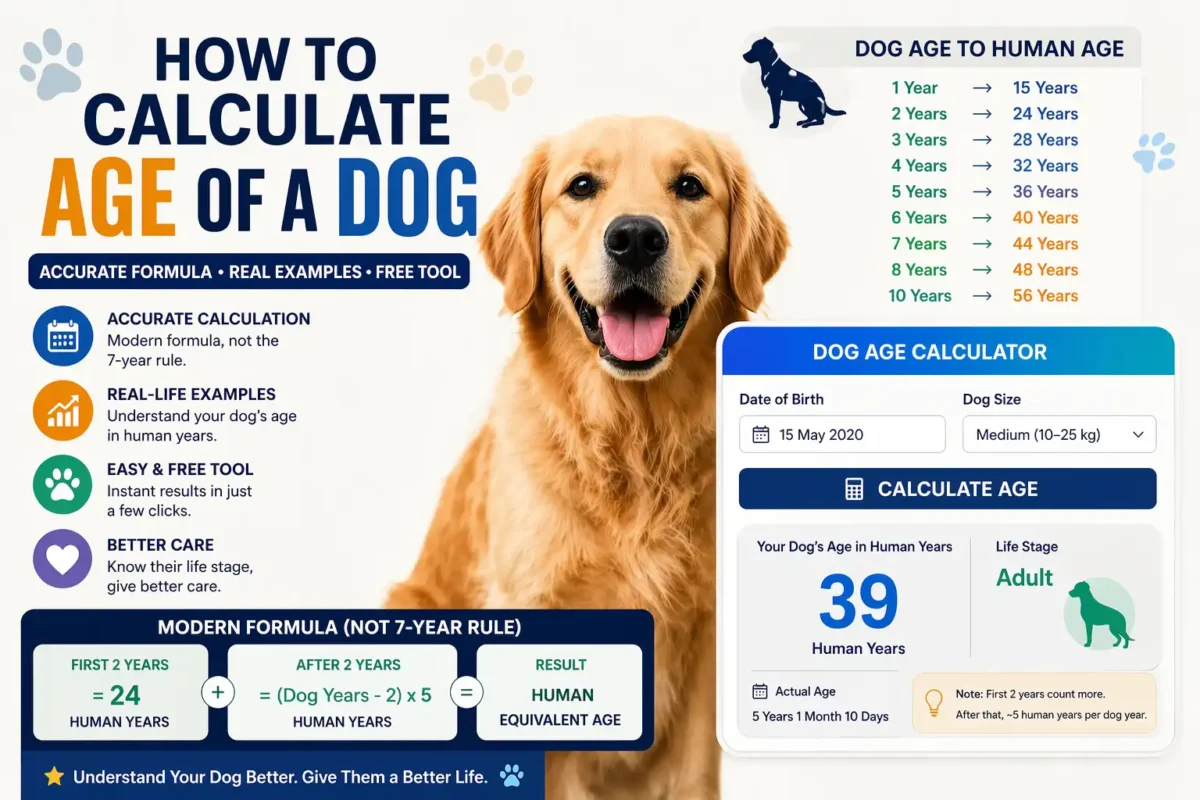
Modern Dog Age Formula
- First 2 years = 10–15 human years each
- After that = 4–5 human years per dog year
Example Calculation
Let’s calculate:
Dog age = 5 years
- First 2 years = 24 human years
- Remaining 3 years = 3 × 5 = 15
👉 Total = 39 human years
Real Example Using Date of Birth
Let’s say:
- Dog DOB: 2020
- Current year: 2026
Dog age = 6 years
Now calculate:
- First 2 years = 24
- Next 4 years = 4 × 5 = 20
👉 Final result = 44 human years
How to Calculate Age from Date of Birth in Excel
This is where most competitors completely fail—they don’t provide practical tools.
Use this formula in Excel:
=DATEDIF(A1, TODAY(), “Y”)
👉 A1 = Date of Birth
You can:
- Calculate human age
- Apply dog age formula after
This is extremely useful for:
- Bloggers
- Developers
- Tool creators
How to Calculate Metabolic Age
Most dog age calculators ignore this completely.
Metabolic age shows how healthy the body is compared to actual age.
Factors:
- Activity level
- Diet
- Weight
- Breed
👉 Example:
- Active dog → lower metabolic age
- Lazy dog → higher metabolic age
This gives you a more realistic understanding of your dog’s health.
Why the 7-Year Rule Is Wrong
The popular formula:
1 dog year = 7 human years
❌ Not accurate
❌ Ignores growth stages
❌ Oversimplified
Dogs grow much faster in early years, so this rule underestimates their real age.
Benefits of Calculating Dog Age Correctly
✔ Better nutrition planning
✔ Improved health care
✔ Early disease detection
✔ Longer lifespan
Understanding age is not just a number—it’s a decision-making tool.
Use Cases (Who Should Use This?)
Pet Owners
- Understand life stage
- Plan diet & exercise
Veterinarians
- Diagnose age-related issues
Bloggers & SEO Experts
- Create high-traffic content
- Build useful tools
For quick estimation tools, you can also check calculators from brands like Pedigree.
However, understanding the actual formula (as explained above) gives you far more accuracy and control.
Explore more tools:


Use a Simple Age Calculator (TOOLXI)
Instead of doing manual calculations every time, you can use:
👉 TOOLXI Age Calculator
It allows you to:
- Calculate age from date of birth
- Use it for humans, pets, and more
- Get instant results
While dedicated dog calculators exist, using a flexible tool gives you more control and versatility.
H2: FAQ Section
Use the modern formula: first 2 years = 10–15 human years, then 4–5 per year.
No, it is outdated and not scientifically correct.
Yes, using:
=DATEDIF(DOB, TODAY(), “Y”)
It represents how healthy the dog is compared to its actual age.
You can use flexible tools like TOOLXI Age Calculator for quick and accurate results.

About toolxi.com
Your all-in-one digital toolkit
“Hi, I’m Prachi , creator of toolxi.com…” your free, no-nonsense solution for everyday digital tasks. I’m designed to simplify your workflow with intuitive tools for calculations, PDF manipulation, image editing, text processing, and more. Whether you’re a student, professional, or creator, my goal is to save you time and effort with reliable, browser-based utilities that require zero installation or signup. I’m constantly evolving based on your needs, so feel free to explore and transform how you work online! Try our top tool → Toolxi.com